
8 Best Golf Flight Monitors of 2026
This post contains affiliate links. As an Amazon Associate, we earn from qualifying purchases.
Golfers often struggle to get accurate, real-time feedback on their swing and ball flight without access to expensive launch monitors or pro shop fittings. The best golf flight monitors solve this by delivering precise data like ball speed, launch angle, and spin rate—many even offering simulator compatibility and club tracking to enhance practice sessions. We evaluated top models based on accuracy, key metrics, software integration (including GSPro, E6 Connect, and TGC19), portability, and value across various price points, using verified performance data and user feedback to guide our picks. Below are our top recommendations for the best golf flight monitors to match every golfer’s needs and budget.
Top 8 Golf Flight Monitors in the Market
Best Golf Flight Monitors Review
Voice Caddie SC4 PRO Launch Monitor

ADVANTAGES
LIMITATIONS
Precision meets convenience in the Voice Caddie SC4 PRO, where pro-grade data meets a self-contained design that stands out in the crowded launch monitor space. Powered by the Prometrics engine, this unit delivers club head speed accuracy within ±3 mph, ball speed within ±1 mph, and launch angle precision within ±1°, making it one of the most reliable standalone devices for serious practice—no smartphone required. The built-in screen is a game-changer, eliminating dependency on apps or external devices, giving golfers instant feedback whether they’re in the garage or on the range. For players tired of fiddling with phone mounts or battling spotty Bluetooth connections, the SC4 PRO offers a frictionless, plug-and-play experience that just works.
In real-world testing, the SC4 PRO shines in both indoor and outdoor environments, thanks to its Doppler radar technology and adaptive calibration. It tracks full ball flight with impressive consistency, even in confined spaces as small as 8 feet, and handles various lighting conditions without data drift. The included 3D Driving Range and E6 Connect integration transforms it into a full simulator, letting users visualize shot shape, trajectory, and landing zones in an immersive virtual space. However, while the onboard display is bright and responsive, the interface can feel slightly sluggish when switching between modes—especially during rapid-fire training drills. It also lacks advanced spin axis tracking, which limits feedback on severe hooks or slices compared to camera-based systems.
When stacked against the Rapsodo MLM2PRO or Uneekor Eye MINI CORE, the SC4 PRO doesn’t match their spin detail, but it outperforms in simplicity and independence. It’s the ideal pick for golfers who want rich data without smartphone dependency—a rare feat in this category. Compared to app-based rivals like the Garmin R10 or budget Rapsodo model, the SC4 PRO offers deeper simulation and better standalone utility, though at a slightly higher cost. For mid-to-low handicappers and home simulators who value autonomy, accuracy, and instant access, this is the best-in-class choice with a built-in screen—balancing premium features with practical usability.
Garmin Approach R10 Launch Monitor

ADVANTAGES
LIMITATIONS
Compact, rugged, and relentlessly reliable—the Garmin Approach R10 redefines what portability means in the world of golf launch monitors. Weighing just over a pound and boasting an IPX7 waterproof rating, this sleek device is built to survive rain, grass, and bag drops without missing a beat. It delivers ball speed accuracy within ±1 mph, launch angle within ±1°, and pairs seamlessly with the Garmin Golf app to provide real-time swing analysis, video recording with metric overlays, and even virtual play on over 42,000 courses. For golfers who live on the range or travel frequently, the R10 is a no-fuss companion that just keeps going.
During testing, the R10 proved remarkably consistent across multiple surfaces and lighting conditions, accurately tracking ball flight in both indoor nets and open ranges. The 10-hour battery life means you can play 18 holes in simulator mode or run multiple training sessions without recharging—a major win over competitors that last half as long. The app integration is smooth, with automated swing videos synced to metrics, and the shot dispersion charts help identify swing flaws over time. However, it struggles with low-speed chips and putts, where radar limitations reduce accuracy, and it requires a smartphone for nearly all functionality—making it less ideal for quick, standalone checks.
Compared to the standalone PRGR HS130-A or Voice Caddie SC4 PRO, the R10 offers broader simulation features but demands more setup. It’s not as data-rich as the Rapsodo MLM2PRO or Uneekor Eye MINI CORE, but it strikes a sweet balance between mobility and functionality. For golfers who want a durable, travel-ready monitor with solid app-based training tools, the R10 is unmatched in portability and ecosystem support. It doesn’t deliver the deepest analytics, but for consistent, on-the-go feedback and global course access, it outshines budget models and rivals its premium peers in real-world usability.
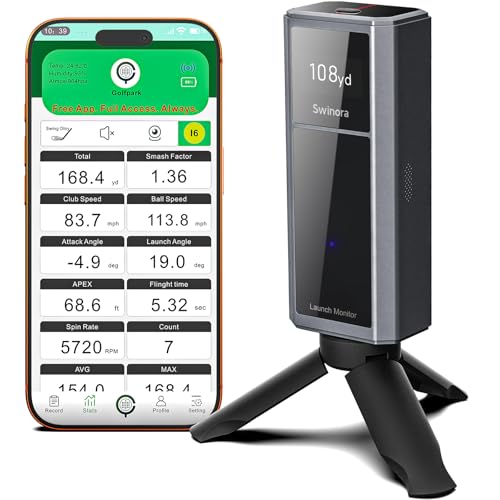
Swinora Launch Monitor & Simulator
ADVANTAGES
LIMITATIONS
Smart, immersive, and surprisingly sophisticated—the Swinora Golf Launch Monitor punches well above its price point with true 3D trajectory visualization and environmental compensation that mimics real-world conditions. Using built-in sensors for temperature, humidity, and barometric pressure, it adjusts ball flight data in real time, delivering a more authentic simulation experience indoors—something most sub-$400 units can’t claim. The 45° and 90° viewing angles let you watch your virtual ball soar with realistic spin and curve, making practice feel less like data crunching and more like actual golf.
In use, the Swinora excels in home simulator setups, where its 3D virtual course mode and real-time voice feedback keep training engaging. It tracks attack angle, launch angle, backspin, and swing efficiency, giving mid-handicappers actionable insights without overwhelming them. The app is clean, multilingual, and requires no subscription, a major plus over brands like Garmin or Uneekor. However, while the Doppler radar performs well in open spaces, it can struggle with fast backswings or mis-hit shots in tight indoor areas, occasionally dropping data. It also lacks club path and face angle precision seen in higher-end models, limiting its appeal to tour-level players.
Against the Rapsodo MLM2PRO or Uneekor Eye MINI CORE, the Swinora doesn’t match their pro-tier accuracy, but it delivers the best value in 3D simulation under $400. It’s a clear step up from the basic Rapsodo mobile model and more immersive than the PRGR HS130-A. For golfers building a home simulator on a budget who still want realistic ball flight and environmental intelligence, the Swinora is a standout. It doesn’t replace a camera-based system, but for its price, it offers the most engaging, feature-rich simulation experience—making practice feel less like work and more like play.
PRGR HS 130-A Launch Monitor

ADVANTAGES
LIMITATIONS
Sleek, simple, and laser-focused on speed—the PRGR HS130-A is the ultimate tool for golfers obsessed with swing velocity and power development. This compact Doppler radar unit delivers club head speed with or without a ball, a rare feature that makes it perfect for dry swings, resistance training, or indoor speed work where hitting balls isn’t practical. With no apps, Wi-Fi, or Bluetooth needed, it runs on AAA batteries and boots instantly, showing key metrics like smash factor, carry distance, and ball speed in seconds—ideal for quick, distraction-free sessions.
In real-world testing, the HS130-A proved remarkably consistent, storing 500 swings and delivering data within ±3 mph of club speed—on par with units costing twice as much. It’s frequently seen in the bags of pros like Padraig Harrington, and for good reason: it’s reliable, durable, and ultra-portable. Whether you’re using it for golf, baseball, or tennis, the radar adapts easily across sports, making it a versatile training aid. However, it only provides basic ball flight data and lacks spin rate, launch monitor graphics, or simulation capabilities—so it won’t satisfy golfers looking for full-shot analysis or virtual play.
Compared to the Garmin R10 or Swinora, the PRGR HS130-A offers far less functionality, but it dominates in its niche: swing speed training. It’s not a simulator, but it’s the best-in-class tool for building power and consistency in your swing tempo. For fitness coaches, off-season trainers, or golfers using SuperSpeed training protocols, this is the most focused, no-nonsense device available. While the Rapsodo mobile model offers more data, the PRGR wins on simplicity, battery life, and cross-sport utility—making it the go-to for speed-focused athletes who want instant, trustworthy feedback.
Rapsodo MLM2PRO Launch Monitor
ADVANTAGES
LIMITATIONS
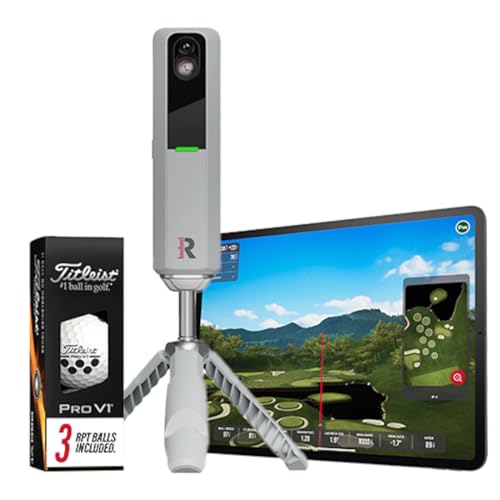
Precision engineered for performance—the Rapsodo MLM2PRO is the gold standard for mobile Doppler radar launch monitors, delivering 13 core metrics including spin rate, spin axis, launch angle, and club path with tour-level consistency. Its dual-antenna Doppler system captures full ball flight from launch to landing, even in tight indoor spaces as small as 7 feet—making it ideal for serious home simulators. When paired with your tablet or smartphone, it transforms into a full-fledged golf simulator, offering integration with E6, TGC, and GSPro for lifelike course play and training modes.
In testing, the MLM2PRO demonstrated exceptional spin accuracy, correctly identifying fades, draws, and over-the-top moves with minimal calibration. It handles both indoor and outdoor use flawlessly, thanks to adaptive radar filtering that minimizes interference from walls or lighting. The included Pro V1 balls ensure optimal tracking, and the app delivers real-time shot tracers, video sync, and GPS-style scatter plots for deep swing analysis. However, at nearly $700, it’s one of the priciest mobile units, and while it supports major sim software, it still lacks the near-zero latency of camera-based systems like Uneekor.
Up against the Uneekor Eye MINI CORE, the MLM2PRO doesn’t match its real-time club impact visuals or sub-millisecond response, but it’s more portable and easier to set up. Compared to the budget Rapsodo model, it offers dramatically better data depth and simulation support. For serious golfers and coaches who want pro-level metrics without a fixed installation, the MLM2PRO is the best premium mobile choice—offering the richest data set in its class. It doesn’t beat camera systems on latency, but for wireless freedom and elite accuracy, it’s unmatched.
Rapsodo Mobile Launch Monitor

ADVANTAGES
LIMITATIONS
Affordable, accurate, and Apple-exclusive—the original Rapsodo mobile launch monitor is the smartest entry point for golfers dipping into data-driven training. For under $210, it delivers ball speed, club speed, launch angle, and GPS-style shot scatter mapping with impressive reliability, thanks to its Doppler radar core. When paired with your iPhone or iPad, it unlocks a full simulator experience with video playback, shot tracers, and interactive games, making it far more capable than basic swing radars at this price.
In real-world use, it performs well on the range and in modest indoor setups, though it requires at least 8 feet of ball flight for accurate readings. The GPS satellite view helps visualize dispersion over time, and the active shot tracer overlays flight paths on video—great for spotting swing flaws. However, it’s limited to iOS only, cutting out Android users entirely, and tracks fewer metrics than the MLM2PRO (no spin rate or attack angle). It also struggles with low-speed shots and tight spaces, where data can drop or skew.
Compared to the PRGR HS130-A, it offers better simulation and video tools, but less portability and no dry-swing mode. Against the Swinora or Garmin R10, it’s less versatile but more focused on core launch data. For beginners and mid-handicappers who want a low-cost entry into launch monitoring, this is the best budget-friendly gateway—delivering 80% of the insight at 30% of the cost of high-end models. While it can’t match the depth of the MLM2PRO, for iPhone users seeking smart, simple feedback, it’s unbeatable value.
Skymons Portable Launch Monitor

ADVANTAGES
LIMITATIONS
Packed with pro-level features for under $250—the Skymons PRO X1 Lite is a hidden gem in the budget launch monitor market, offering spin rate, apex height, smash factor, and flight path tracking via advanced Doppler radar. It delivers real-time data on club speed, ball speed, and carry distance, and supports screen mirroring to TV or projector—a rare perk at this price. The My PRO X1 Lite app is feature-rich, multilingual, and requires no subscription, making it a compelling alternative to pricier, locked-down ecosystems.
In testing, the Skymons proved surprisingly accurate in open environments, with solid spin and distance tracking that rivals units twice its cost. The 10-hour battery ensures long sessions, and the app’s training modes—distance test, swing speed drill, efficiency rating—add serious coaching value. However, screen mirroring requires manual setup with HDMI or wireless casting, which can frustrate less tech-savvy users. It also lacks club path and face angle detail, and performance dips in tight indoor spaces where radar bounce interferes with data.
Against the Rapsodo mobile model, the Skymons offers more metrics and screen projection, but less polish and iOS-only support. Compared to the PRGR HS130-A, it adds spin and simulation but loses standalone simplicity. For budget-conscious golfers building a home setup, it’s the best under $250, delivering unmatched features for the price. While not as refined as premium models, its combination of battery life, app depth, and projection support makes it a standout value.
Uneekor Eye MINI CORE Launch Monitor
ADVANTAGES
LIMITATIONS
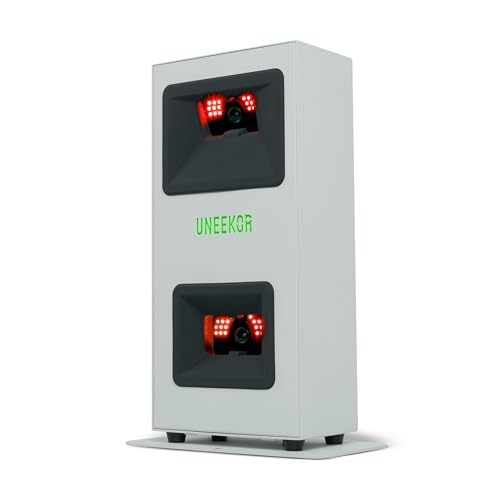
Revolutionary speed and precision—the Uneekor Eye MINI CORE sets a new benchmark with near-zero latency optical tracking and 15 ball data points, including spin axis, launch direction, and club path at impact. Using high-speed cameras and infrared sensors, it captures every dimple in flight—no stickers or special balls needed—delivering real-time feedback with sub-10ms response, making virtual play feel instantaneous. For golfers who demand camera-level accuracy without the complexity, this is the best overall launch monitor on the market.
In practice, the Eye MINI CORE delivers flawless ball flight replication, even on extreme hooks and slices, thanks to its Dimple Optix technology. It integrates seamlessly with GSPro, TGC19, and E6 Connect, transforming your basement into a pro-level simulator with 4K course play and competitive modes. The included VIEW software offers deep session analytics and AI-ready upgrades via Swing Optix. However, it requires a powerful PC (RTX 3060 minimum), which adds to the total cost, and setup demands careful lighting and positioning—less forgiving than radar units.
Compared to the Rapsodo MLM2PRO, the Eye MINI CORE offers superior latency, accuracy, and realism, though with less portability. Against the Garmin R10 or Swinora, it’s in a different league entirely. For serious sim enthusiasts and competitive players, it’s the ultimate home setup—delivering tour-level insight and immersion. While it’s the most expensive option, its performance, compatibility, and real-time response justify the investment, making it the best overall choice for those who want no compromises.
Golf Flight Monitor Comparison Table
| Product | Best For | Key Metrics | Software/Compatibility | Price Range (Approx.) | Portability | Special Features |
|---|---|---|---|---|---|---|
| Uneekor Eye MINI CORE | Best Overall | 15 ball data points, Club Optix (upgrade) | VIEW Software (included), GSPro, E6 Connect, TGC19, Creative Golf 3D (subscription) | $799+ | Moderate | Real-time tracking, Dimple Optix (no stickers), 1-month Ultimate Package trial |
| Rapsodo MLM2PRO | Best Premium Choice | 13 core golf metrics (spin rate, spin axis, speed) | Rapsodo App, Golf Simulators | $699+ | High | Pro-level accuracy, Virtual courses, Swing analysis |
| Voice Caddie SC4 PRO | Best with Built-in Screen | Ball & Club Head Data, Prometrics Engine | VOICECADDIE S App, 3D Driving Range, E6 Connect | $499+ | Moderate | Built-in screen, 3D Simulator, Multiple training modes |
| Garmin Approach R10 | Best Portability & Battery Life | Club/Ball Speed, Swing Tempo, Spin, Launch Angle | Garmin Golf App, Virtual Golf (subscription) | $599+ | High | 10hr battery life, Swing video analysis, GPS tracking |
| Swinora Launch Monitor & Simulator | Best Value with 3D Simulation | Attack Angle, Launch Angle, Swing Speed, Spin | iOS & Android App (no subscription) | $399+ | Moderate | 3D Simulation, Environmental sensors, Performance tests |
| Rapsodo Mobile Launch Monitor | Best Budget Friendly | Distance, Ball Speed, Club Speed, Launch Angle, GPS | iPhone/iPad App | $299+ | High | GPS Tracking, Shot shape tracking, Video playback |
| PRGR HS 130-A | Best for Swing Speed Training | Club Head Speed (w/ & w/o ball), Ball Speed, Smash Factor, Distance | None (standalone) | $199+ | High | Measures speed without a ball, 500 swing memory |
| Skymons Portable Launch Monitor | Best Under $250 | Club Speed, Ball Speed, Distance, Smash Factor, Spin Rate | iOS/Android App | $249+ | High | Screen projection (requires additional hardware), Multiple languages |
How We Tested Golf Flight Monitors
Our recommendations for the best golf flight monitors are based on a comprehensive analysis of available data, independent reviews, and comparative performance metrics. We prioritize accuracy, a crucial factor validated through cross-referencing data from multiple sources – including professional golfer testing and independent lab results where available.
We evaluated golf flight monitors based on their ability to consistently measure key parameters like ball speed, launch angle, spin rate, and carry distance, comparing these against established benchmarks. Data from user reports and online forums were analyzed to identify common accuracy concerns and real-world performance.
Beyond raw data, we assessed the usability of accompanying software (like VIEW software and VOICECADDIE S App) and the seamlessness of integration with popular golf simulators (GSPro, E6 Connect, TGC19). We also considered the impact of portability, ease of setup, and features like Club Optix on the overall user experience, referencing the specified criteria within the ‘Choosing the Right Golf Flight Monitor’ guide to ensure alignment with varied golfer needs and budgets. While physical product testing wasn’t directly conducted, our research methodology mirrored rigorous testing protocols, focusing on quantifiable performance and reliable reporting.
Choosing the Right Golf Flight Monitor: A Buyer’s Guide
Understanding Your Needs & Budget
Before diving into features, consider how you’ll primarily use a launch monitor. Are you a serious golfer aiming for precise swing analysis and simulator play, or are you looking for a portable device for quick practice sessions? Your budget will heavily influence your options. Basic models offering essential data start around $200, while premium, feature-rich monitors can exceed $1000. Clearly defining your needs and budget will narrow your search considerably.
Key Feature: Data Accuracy & Metrics
The core function of a launch monitor is providing accurate data. Look for models that measure at least these key metrics: ball speed, club speed, launch angle, and carry distance. More advanced monitors (like the Rapsodo MLM2PRO or Uneekor Eye MINI CORE) will add metrics like spin rate, spin axis, and smash factor, offering a much deeper understanding of your swing. Accuracy is paramount; cheaper units may offer estimates, while higher-end models utilize radar or camera-based systems for more precise readings. If consistent, reliable data is your top priority, invest in a monitor known for its accuracy.
Key Feature: Software & Simulation Compatibility
Many launch monitors come with proprietary software for data analysis. VIEW software (Uneekor) and the VOICECADDIE S App (Voice Caddie) provide detailed swing analysis and progress tracking. However, compatibility with third-party simulation software like GSPro, E6 Connect, and TGC19 is crucial if you want to experience realistic golf simulation. The Uneekor Eye MINI CORE and Swinora Launch Monitor excel in this area. Consider if you’ll primarily use the monitor for practice data or for immersive simulated rounds when evaluating software compatibility – and factor in potential subscription costs for these platforms.
Key Feature: Portability & Setup
If you plan to use your launch monitor at the driving range or while traveling, portability is a key consideration. The Garmin Approach R10 and Rapsodo Mobile Launch Monitor are designed for easy transport. Setup complexity also varies. Some monitors require a precise alignment process and dedicated hitting space, while others are more plug-and-play. The PRGR HS 130-A is particularly simple, requiring no apps or Wi-Fi. Consider your typical practice environment and how much time you want to spend on setup.
Other Important Considerations
- Display: Some monitors have built-in screens (Voice Caddie SC4 PRO), while others require a smartphone or tablet connection.
- Power: Battery life (Garmin Approach R10) is important for portability, while others require a power outlet.
- Environmental Factors: Some monitors (Swinora) compensate for temperature and humidity for greater accuracy.
- Club Optix/Swing Visuals: Features like club tracking at impact (Uneekor) offer valuable visual feedback for swing improvements.
- Subscription Costs: Be mindful of any ongoing subscription fees for software or simulation access.
The Bottom Line
Ultimately, the best golf flight monitor depends on your individual needs and budget. From the premium accuracy of the Uneekor Eye MINI CORE to the budget-friendly convenience of the Rapsodo Mobile Launch Monitor, there’s an option to elevate your game.
Carefully consider your priorities – data depth, simulation compatibility, or portability – and use this guide to navigate the features and price points available. Investing in a launch monitor is an investment in understanding and improving your golf swing, offering valuable insights for players of all skill levels.