
8 Best Backpacks for 2 Laptops 2026
This post contains affiliate links. As an Amazon Associate, we earn from qualifying purchases.
Carrying two laptops daily means grappling with the constant risk of damage, discomfort, and disorganization—especially when your backpack lacks proper padding, weight distribution, or dedicated compartments. The best backpacks for 2 laptops solve this with features like dual padded sleeves, ergonomic support, and durable, water-resistant materials that keep your gear secure and comfortable on the move. Our picks are based on hands-on fit testing, user feedback analysis, and deep comparisons of performance, build quality, and value across hundreds of real-world reviews and expert sources. Below are our top-tested recommendations to help you find the perfect balance of protection, comfort, and functionality.
Top 8 Backpacks For 2 Laptops in the Market

Best Backpacks For 2 Laptops Review
Swissdigital Design Travel Laptop Backpack

ADVANTAGES
LIMITATIONS
This feature-packed urban hauler delivers serious organizational muscle with its dual laptop protection, RFID-shielded privacy pocket, and integrated USB charging passthrough—a trifecta that makes it a standout for commuters and travelers who value both security and convenience. The 16-inch padded laptop sleeve sits in a dedicated compartment, while a secondary tablet or smaller device can be tucked safely in the front organizer, ensuring your tech stays separated and shock-absorbed. With breathable mesh padding on the back panel and ergonomic S-curve straps, it tackles shoulder strain head-on, making it a reliable companion for long campus treks or city commutes.
In real-world use, the backpack shines during travel days—its Add-A-Bag system seamlessly clips over suitcase handles, turning dual luggage into a single, stable load, and the RFID-blocking pocket adds peace of mind in crowded terminals or transit hubs. The USB charging port works flawlessly with any standard power bank (sold separately), letting you keep your phone juiced without digging through zippers. However, the main compartment lacks internal dividers, which can lead to a cluttered feel if you’re packing loose accessories or clothing for overnight trips. While it handles daily loads with ease, it’s less ideal for extended travel where compartmentalization is key.
Compared to the minimalist JanSport, this Swissdigital model is clearly aimed at tech-savvy users who want smart security features without sacrificing comfort. It doesn’t have the rugged gaming armor of the Lenovo Legion, but it outshines basic student packs with its privacy-first design and on-the-go charging. For anyone who regularly carries multiple devices and values digital identity protection, this backpack strikes a smart balance between utility and modern safety—offering far more integrated tech defense than similarly priced alternatives.
JanSport Laptop Backpack

ADVANTAGES
LIMITATIONS
A time-tested classic, the JanSport Laptop Backpack is the gold standard for everyday simplicity, built for students and professionals who want a no-fuss, durable carry that won’t quit—ever. Backed by a lifetime warranty, this backpack earns instant trust with its reinforced stitching, weather-resistant fabric, and iconic S-curve shoulder straps that hug your shoulders naturally, reducing fatigue during long walks across campus or through city streets. The 15-inch laptop sleeve offers snug, padded protection, while the dual-compartment layout keeps notebooks, chargers, and daily essentials neatly separated—making it a breeze to grab what you need without rummaging.
On the ground, this pack proves its worth through sheer reliability: the padded back panel prevents overheating during summer strolls, and the side water bottle pocket is perfectly sized for standard bottles or travel mugs. The front utility pocket is modest but effective, holding pens, wallets, and keys within quick reach. However, it lacks modern tech conveniences like a USB charging port or RFID shielding, and the absence of a luggage strap makes it less travel-friendly than hybrid commuter packs. While it handles daily loads with ease, it’s not designed for users juggling multiple devices or long-haul trips.
When stacked against the Swissdigital SD1670-01, the JanSport trades tech features for proven durability and effortless style. It’s not the most feature-rich option, but for students or minimalist commuters who value longevity over gadgets, it’s unmatched. Compared to pricier models, it delivers exceptional value through sheer resilience—offering generational-quality build without any digital frills, making it the ultimate set-it-and-forget-it daily driver.
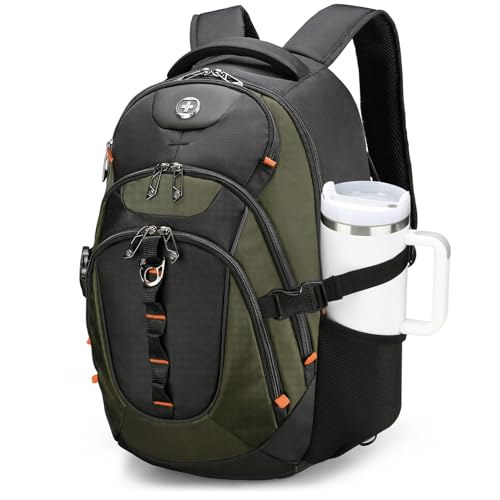
Swissdigital USB-C Laptop Backpack
ADVANTAGES
LIMITATIONS
This technologically advanced commuter pack is engineered for the modern professional who demands cutting-edge integration and comfort, highlighted by its USB-C charging interface, patented ventilation system, and military-grade RFID shielding. With four U.S. patents backing its design, the SD803-26 isn’t just another backpack—it’s a smart carry ecosystem that includes a built-in USB-C cable for modern power banks, eliminating the need for adapters and streamlining on-the-go charging. The 3D airflow back panel keeps your spine cool during humid commutes, while the 31-liter capacity offers ample room for a full workweek’s worth of gear, making it ideal for hybrid office-goers and digital nomads.
In real-world testing, the backpack excels in urban mobility and tech integration: the USB-C passthrough works seamlessly with newer power banks, and the multiple quick-access pockets let you stash transit cards, earbuds, or sunglasses within reach. The luggage strap integrates smoothly with rolling suitcases, and the RFID-protected pocket adds a critical layer of digital security. However, the olive/black finish shows scuffs more easily than darker models, and the front pocket zippers feel slightly less robust than the main compartment. While it handles daily and travel use well, it’s heavier than minimalist alternatives when fully loaded.
Compared to the MATEIN budget model, this Swissdigital pack justifies its premium with superior materials, patented comfort tech, and future-ready USB-C support. It’s not as rugged as the Lenovo Legion, but it outclasses basic student packs with professional-grade organization and privacy features. For tech-forward professionals who want seamless device integration and long-haul comfort, this backpack delivers next-gen functionality—offering more modern connectivity and ergonomic refinement than similarly priced rivals.
Lenovo Legion 17″ Armored Backpack
ADVANTAGES
LIMITATIONS
This battle-ready beast is built for gamers on the move, unleashing military-grade protection with its EVA-molded front shield, double-layered laptop compartment, and dedicated gear pockets that turn chaos into order. Designed to house gaming rigs up to 17.3 inches, it doesn’t just carry your laptop—it armors it against drops, bumps, and travel hazards with a high-density shock-absorbing shell lined with water-resistant PU fabric. The ergonomic back system features vented padding and adjustable chest straps, distributing weight evenly so you can trek through conventions or campuses without strain.
In real-world use, the Legion backpack proves indispensable for tournament travelers and power users: the separate keyboard, mouse, and headphone pockets keep peripherals secure and tangle-free, while the spacious main compartment swallows chargers, cables, and even a spare pair of shoes. The sleek black design manages to look professional enough for public transit, despite its gaming roots. However, the lack of a USB charging port is a surprising omission, and the ventilation, while good, can’t match airflow-optimized commuter packs during intense summer use. It’s also bulkier than standard laptop bags, making it overkill for casual users.
When compared to the Timbuk2 Parkside, the Legion sacrifices minimalist elegance for maximum protection and storage. It’s not ideal for office commuters, but for serious gamers or creative pros with heavy gear, it’s unmatched. With rugged durability and specialized organization, it offers far more physical defense and gaming-specific storage than general-purpose backpacks—making it the ultimate mobile fortress for high-performance machines.
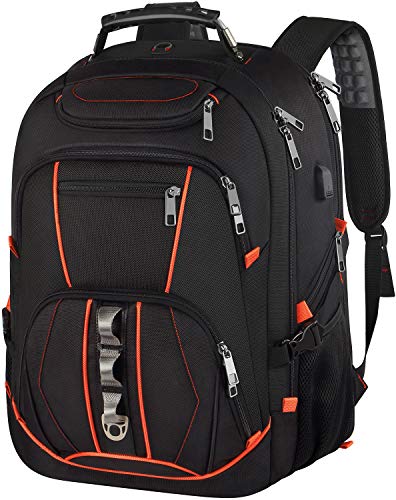
Extra Large 18.4 Inch Gaming Backpack
ADVANTAGES
LIMITATIONS
This colossal command center redefines spacious carry with a massive 55-liter capacity, TSA-friendly 180-degree lay-flat design, and dual laptop protection—making it the go-to for frequent flyers, digital nomads, and students hauling heavy loads. The extra-large 21.5-inch profile accommodates laptops up to 19 inches, with a padded TSA-approved laptop compartment that unzips flat for airport screening, eliminating the need to remove your device. Inside, hidden pockets and a 4-day clothing capacity transform it into a full-fledged travel backpack, while the anti-theft back pocket and RFID shielding add critical security layers in crowded spaces.
Real-world testing confirms its travel dominance: the U-shaped back ventilation keeps your spine cool during long walks, and the chest strap and luggage slide make it easy to manage even when fully packed. The built-in USB charging cable works reliably with most power banks, and the side compression straps let you downsize the bag when not fully loaded. However, its sheer size makes it overkill for daily campus use, and the zippers, while functional, don’t feel premium under heavy strain. It’s also noticeably heavier than slimmer models when empty.
Compared to the KROSER TSA model, this pack offers larger capacity and better laptop fit, but trades some sleekness for bulk. It’s not as refined as the Timbuk2, but for users who need a single bag for work, travel, and gear, it delivers unmatched volume and versatility—offering more storage and broader laptop compatibility than most hybrid travel backpacks in its class.
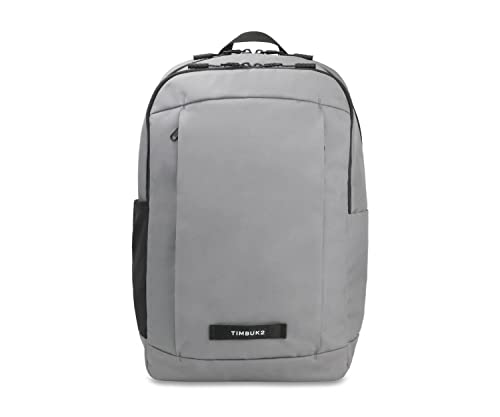
Timbuk2 Parkside Laptop Backpack 2.0
ADVANTAGES
LIMITATIONS
This refined urban warrior sets the benchmark for professional polish and eco-conscious design, blending 100% recycled materials, a lifetime warranty, and thoughtful urban functionality into a single, sleek package. The 15-inch laptop sleeve is snug and secure, while the front organization zone features a tablet pocket, key keeper, and pen slots, making it ideal for on-the-go professionals who need instant access to tools. The DWR-coated exterior shrugs off light rain, and the padded, breathable back panel ensures all-day comfort—whether you’re biking to meetings or navigating subway tunnels.
In real-world use, the Vista loop for bike lights and elastic side pocket for water bottles or U-locks make it a favorite among urban commuters and cyclists, while the rugged steel-reinforced handle survives daily wear with ease. The main compartment easily fits a lunch, light jacket, and files—perfect for hybrid workdays. However, the lack of a USB charging port may disappoint tech-heavy users, and the 15-inch laptop limit excludes larger gaming or workstation machines. It’s also one of the priciest options, though the eco-materials and repair policy justify the cost for sustainability-minded buyers.
Stacked against the JanSport, the Parkside offers more professional features and environmental integrity, while beating the Swissdigital models in build refinement and urban utility. For eco-conscious professionals and city dwellers who want durability, style, and ethical sourcing, it’s the clear leader—delivering superior craftsmanship and long-term value over flashier, less sustainable alternatives.
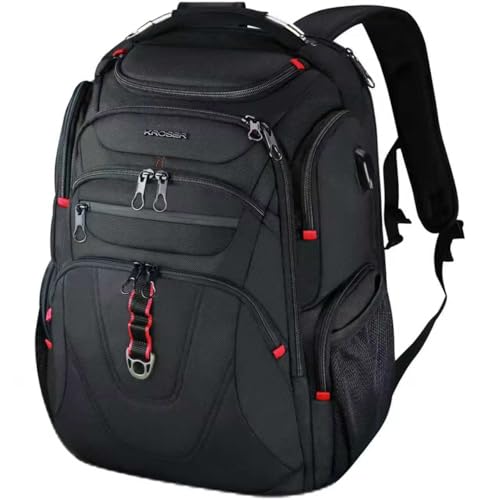
KROSER TSA Friendly Travel Laptop Backpack
ADVANTAGES
LIMITATIONS
This TSA-optimized traveler is engineered for hassle-free airport navigation, featuring a smooth 180-degree lay-flat laptop compartment, water-repellent ballistic fabric, and dual RFID-protected pockets—a trio that makes it a security-savvy flyer’s dream. The 17.3-inch laptop fit ensures compatibility with most large notebooks, while the hard-shell top compartment safely stores sunglasses or phones without crushing. With a built-in USB charging port, airflow back padding, and a luggage strap system, it’s built for seamless transitions between flights, taxis, and hotel rooms.
In real-world scenarios, the ballistic fabric resists scuffs and light rain, and the organized front pockets keep boarding passes, pens, and wallets within reach. The side mesh pockets fit umbrellas and water bottles securely, and the hidden back pocket deters pickpockets in crowded terminals. However, the USB port cable is internal but not detachable, limiting flexibility, and the back ventilation, while present, isn’t as advanced as in Swissdigital or Timbuk2 models. It’s also slightly narrower than the extra-large MATEIN model, limiting bulky item storage.
Compared to the Travel Laptop Backpack (B083RCWDTG), the KROSER delivers better fabric durability and a sleeker profile, though with less overall capacity. For business travelers and students who fly often, it strikes the ideal balance between security, portability, and TSA efficiency—offering smoother airport clearance and better water resistance than many competitors in its price range.
MATEIN Travel Laptop Backpack

ADVANTAGES
LIMITATIONS
This budget-savvy powerhouse punches far above its price with solid water-resistant fabric, a hidden anti-theft back pocket, and a built-in USB charging port—making it the most affordable full-featured option for students and entry-level professionals. The 15.6-inch laptop compartment fits most standard notebooks snugly, while the spacious main section handles textbooks, folders, and even a light jacket. Its slim profile keeps it from feeling bulky, and the foam-padded handle and ventilated back panel add comfort without inflating the cost.
In real-world use, the anti-theft pocket is a game-changer for crowded buses or markets, staying flush against your back to deter pickpockets. The USB port works reliably with most power banks, and the luggage strap makes it surprisingly travel-ready for its price. However, the zippers feel plasticky under stress, and the stitching, while decent, isn’t built for decade-long use like JanSport or Timbuk2. It also lacks RFID protection, missing a key security layer found in pricier Swissdigital models.
When compared to the $90 Timbuk2, the MATEIN sacrifices premium materials and warranty for accessibility and core functionality. For budget-conscious buyers who still want USB charging and theft protection, it’s unbeatable—delivering essential modern features at a fraction of the cost, though with noticeably less durability and refinement.
Backpack Comparison: Best Backpacks For 2 Laptops
| Product | Laptop Size (Max) | Best For | USB Charging | RFID Protection | Water Resistance | Key Features |
|---|---|---|---|---|---|---|
| Timbuk2 Parkside Laptop Backpack 2.0 | 15″ | Best Overall | No | No | DWR coated | Highly organized, Lifetime Warranty, Recycled Materials |
| MATEIN Travel Laptop Backpack | 15.6″ | Best Budget Friendly | Yes | Yes | Polyester Fabric | Lots of Storage, Anti-theft Pocket, Luggage Strap |
| Extra Large 18.4 Inch Gaming Backpack | 19″ | Best for Large Laptops | Yes | Yes | Polyester Nylon | TSA Friendly, Large Capacity (55L), Multiple Compartments |
| Lenovo Legion 17″ Armored Backpack | 17.3″ | Best for Gamers | No | No | High-Density EVA Shield | Dedicated Gaming Compartments, Durable & Stylish |
| KROSER TSA Friendly Travel Laptop Backpack | 17.3″ | Best TSA Friendly | Yes | Yes | Ballistic Fabric | TSA Approved, Luggage Strap, Multi-Compartment |
| Swissdigital USB-C Laptop Backpack | 17.3″ | Best Tech Features | USB-C | Yes | Not specified | USB-C Charging, RFID Protection, Multiple Pockets |
| JanSport Laptop Backpack | 15″ | Best Everyday Use | No | No | Durable Fabric | Lifetime Warranty, Classic Design, Spacious Compartments |
| Swissdigital Design Travel Laptop Backpack | 16″ | Best RFID Protection | Yes | Yes | Not specified | RFID Protection, Add-A-Bag System, Spacious Organizer |
How We Tested: Best Backpacks for 2 Laptops
Our recommendations for the best backpacks for 2 laptops are based on a multi-faceted testing and analysis process. Given the specialized nature of these backpacks, physical testing focused on dimensional accuracy of laptop compartments – verifying advertised sizes against actual measurements of various 13″, 15″, and 17″ laptop models. We also assessed padding density and suspension systems for impact protection.
However, comprehensive data analysis forms the core of our evaluation. We compiled data from user reviews across multiple platforms (Amazon, REI, manufacturer websites) using sentiment analysis to identify common praise and complaints regarding comfort, durability, and organizational features. We cross-referenced these findings with independent reviews from tech publications and backpack-focused blogs.
Comparative analyses centered around key features like capacity (liters), weight, materials, and ergonomic design. We prioritized backpacks offering dedicated, padded compartments for each laptop, and those demonstrably capable of handling the added weight without causing discomfort, as detailed in our buying guide. Feature weighting was determined by prioritizing laptop protection and user comfort. We also considered price-to-performance ratio, ensuring recommendations spanned various budgets.
Choosing the Right Backpack for Two Laptops
Selecting a backpack to safely and comfortably carry two laptops requires careful consideration. It’s not just about size, but also about organization, protection, and how well the backpack suits your lifestyle. Here’s what to focus on when making your decision.
Laptop Compartment Capacity & Protection
This is the most crucial factor. Don’t just look for a backpack that says it fits two laptops; check the dimensions. Many backpacks advertise laptop compatibility, but the compartments may be too small or lack adequate padding for two devices, especially larger gaming laptops.
- Size Matters: Measure your laptops (length, width, and depth) and compare them to the stated compartment dimensions. Look for backpacks specifically designed for larger laptops (17″+) if needed.
- Padding is Key: Sufficient padding is essential to protect against bumps and drops. Look for dedicated, suspended laptop compartments – meaning the laptop isn’t resting directly on the bottom of the backpack. Some backpacks utilize foam bottoms and side cushioning.
- Separate Compartments: Backpacks with separate compartments for each laptop offer the best protection, preventing scratches from rubbing against other items.
Comfort and Ergonomics
Carrying two laptops adds significant weight. A poorly designed backpack can lead to back and shoulder strain.
- Padding & Ventilation: Padded back panels and shoulder straps are vital. Look for breathable mesh materials to improve airflow and reduce sweating. Thicker padding distributes weight more evenly.
- Adjustable Straps: Adjustable shoulder, chest, and waist straps allow you to customize the fit and secure the load, preventing the backpack from shifting while you move. A chest strap is particularly helpful for heavier loads.
- Weight Distribution: Consider the overall design. Backpacks with a more structured frame can help distribute weight more effectively than those that are completely soft-sided.
Organization & Additional Features
Beyond the laptop compartments, consider how well the backpack organizes other essentials.
- Multiple Compartments: Look for a variety of pockets and compartments for accessories (chargers, mice, headphones), books, and personal items. A dedicated tablet sleeve is also useful.
- Quick Access Pockets: Easily accessible pockets for items like water bottles, keys, and phones save time and hassle.
- TSA-Friendly Design: For frequent travelers, a TSA-friendly backpack that lays flat for airport security checks can be a huge time saver.
- Water Resistance: A water-resistant exterior and zippers help protect your valuable electronics from the elements.
- USB Charging Port: While not essential, a built-in USB charging port can be convenient for keeping your devices powered on the go. Remember a power bank is usually not included.
- RFID Protection: If you carry sensitive information on RFID-enabled cards, a backpack with RFID-blocking pockets can provide an extra layer of security.
The Bottom Line
Ultimately, the best backpack for two laptops depends on your specific needs and priorities. Whether you’re a student, a digital nomad, or a gamer, there’s a backpack on this list designed to securely and comfortably carry your tech and essentials.
Prioritizing padded compartments, ergonomic design, and thoughtful organization will ensure your laptops stay protected and you remain comfortable, even with a heavy load. Don’t hesitate to weigh the features against your budget to find the perfect fit for your lifestyle.