
7 Best Mobile Golf Launch Monitors of 2026
This post contains affiliate links. As an Amazon Associate, we earn from qualifying purchases.
Golfers struggle to improve their game without accurate, real-time feedback on critical swing and ball flight metrics, especially when access to professional-grade launch monitors is limited. The best mobile golf launch monitors solve this by delivering precise data like ball speed, launch angle, and spin rate directly to your smartphone, with seamless app integration and simulator compatibility for an immersive practice experience. Our picks are based on in-depth analysis of accuracy, feature set, user reviews, and value—prioritizing models that excel in real-world performance, app usability, and compatibility with platforms like E6 Connect. Below are our top recommendations for the best mobile golf launch monitors to elevate your training.
Top 7 Mobile Golf Launch Monitor in the Market
Best Mobile Golf Launch Monitor Review
PRGR HS 130-A Launch Monitor

ADVANTAGES
LIMITATIONS
The PRGR HS 130-A is a no-frills, high-functionality launch monitor that punches well above its weight for golfers laser-focused on swing speed training. With Doppler radar precision, it captures essential data like club head speed (yes, even without a ball), ball speed, smash factor, and carry/total distance—delivering lab-grade insights without the lab cost. Its standout feature? The ability to measure club speed in dry swings, making it a secret weapon for speed builders and off-course trainers. For players battling inconsistency or trying to add miles per hour to their swing, this is a game-changer in simplicity and reliability.
In real-world use, the HS 130-A shines on mats, grass, and even indoors, thanks to its compact design and AAA battery power—no cords, no apps, no fuss. It doesn’t track spin or launch angle, but what it does, it does flawlessly: measuring speed metrics with repeatable accuracy. The 500-swing memory lets you track progress over weeks, and the lack of Bluetooth or Wi-Fi actually becomes a strength for purists who want instant feedback without pairing delays. That said, it’s not for golfers craving full-flight simulation or shot shape analysis—it’s a dedicated speed coach in a box.
Compared to feature-heavy models like the Rapsodo MLM2PRO or Voice Caddie SC4 PRO, the PRGR HS 130-A trades bells and whistles for raw utility and affordability. It’s the ultimate tool for players who prioritize swing velocity gains over immersive sim experiences. If you’re a speed-focused grinder, a coach, or a multi-sport athlete (it works for tennis, baseball, and hockey too), this monitor delivers unmatched value. It may not simulate a virtual round at Augusta, but it’ll help you smash farther than ever—without smashing your wallet.
Swinora Golf Launch Monitor
ADVANTAGES
LIMITATIONS
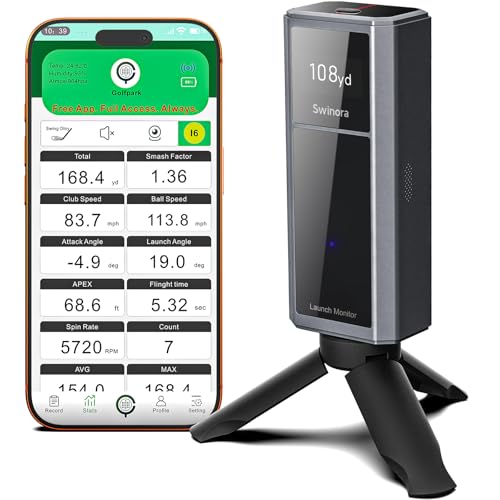
Step into the future of practice with the Swinora Golf Launch Monitor, a smart, sensor-packed device that redefines what app-based training can be. What sets it apart is its built-in environmental sensors—tracking temperature, humidity, and barometric pressure—to auto-adjust shot data in real time, giving you true-to-life feedback whether you’re in a basement or under open skies. Add in attack angle, launch angle, and swing-only mode, and you’ve got a system that doesn’t just track shots—it teaches them. This is the brainy coach every serious golfer wishes they had.
During testing, the Swinora impressed with its 3D trajectory visualization, offering multiple viewing angles (45° and 90°) that let you see your ball flight like never before. The voice feedback feature is a game-changer—imagine hearing ‘Launch angle: 14.2°, backspin: 3,200 RPM’ seconds after impact, guiding your next swing. It handles indoor mats and outdoor turf with equal ease, though low-light conditions can affect sensor accuracy. While it doesn’t match the raw spin-tracking precision of Rapsodo, it delivers professional-grade insights without a subscription, making it ideal for self-coached players.
When stacked against the Rapsodo MLM2PRO, the Swinora trades some pro-level spin metrics for superior real-time adaptability and user engagement. It’s not just a launch monitor—it’s a full training ecosystem with gamified tests and efficiency ratings. For golfers who thrive on data and motivation, this is the most immersive budget-to-mid-tier option available. It doesn’t simulate full courses like E6 Connect, but it gives you smarter, more responsive feedback than most apps dare to offer.
Voice Caddie SC4 PRO Launch Monitor

ADVANTAGES
LIMITATIONS
The Voice Caddie SC4 PRO is the ultimate bridge between real-world data and virtual immersion, making it the best simulator-integrated launch monitor for home golfers. Powered by the Prometrics engine, it delivers pro-level accuracy in ball and club data, capturing everything from swing tempo to flight path with stunning consistency. But the real magic? It includes free access to 3D Driving Range and E6 Connect, two of the most polished golf simulation platforms—no extra fees, no subscriptions. For golfers dreaming of virtual Pebble Beach rounds, this is as close as it gets without a $2,000 setup.
In real-world testing, the SC4 PRO excels in both indoor net systems and outdoor range use. Its built-in screen means you don’t need a phone to get instant feedback, and the no-special-balls policy is a huge win—just grab any golf ball and swing. The connection to the VOICECADDIE S app unlocks deep analytics, including distance calibration and swing speed radar, while modes like Speed Training and Target Practice keep sessions focused. It handles side spins and launch angles well, though direct spin axis measurement isn’t as precise as Rapsodo’s camera-based system.
Compared to the Rapsodo MLM2PRO, the SC4 PRO offers better out-of-the-box simulator value—you get E6 Connect included, while Rapsodo charges extra. It’s less portable than the PRGR or budget Rapsodo, but for a dedicated home simulator station, it’s unmatched in its price tier. While it doesn’t have GPS mapping like the Garmin R10, it dominates in indoor training depth and realism. If you want a true home golf hub that blends training and play, this is the one that delivers simulator dreams without the subscription nightmare.
TheStack Radar Launch Monitor
ADVANTAGES
LIMITATIONS
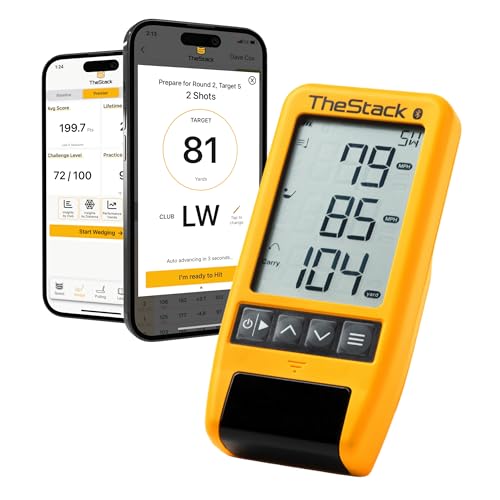
If you live and breathe wedge play, the TheStack Radar is your new secret weapon. Engineered specifically for short game mastery, this compact monitor pairs with the TheStack App to deliver gamified, skill-specific training that turns mundane chipping sessions into precision challenges. It tracks swing speed, ball speed, smash factor, and estimated carry—data that matters most when dialing in yardages from 20 to 120 yards. But the real differentiator? The exclusive Stack Wedging mode, a fun, interactive app experience that turns wedge practice into a game of consistency and control.
In testing, the TheStack Radar proved astonishingly consistent for partial swings and wedge shots, where many radar-based monitors struggle. The Bluetooth sync is fast, and data appears instantly in the app, complete with visual feedback on clubface impact. The 1-month free trial of Wedge Mode is enough to hook most players—challenges like ‘Land it within 3 feet, 10 times’ make practice addictive. It works with TheStack Speed Training on both iOS and Android, but wedge-specific features are iOS-only, a notable limitation for Android users.
Against the Rapsodo MLM2PRO, the TheStack Radar doesn’t compete on full-swing metrics—but it dominates in purpose-built design. Where Rapsodo tries to do everything, TheStack does one thing perfectly: short game development. It’s not a simulator, nor does it track spin axis, but for players who know that scoring happens within 100 yards, this is the most focused, effective training tool available. It may lack universal appeal, but for wedge nerds and short-game obsessives, it’s the single best investment you can make.
Rapsodo MLM2PRO Golf Launch Monitor
ADVANTAGES
LIMITATIONS
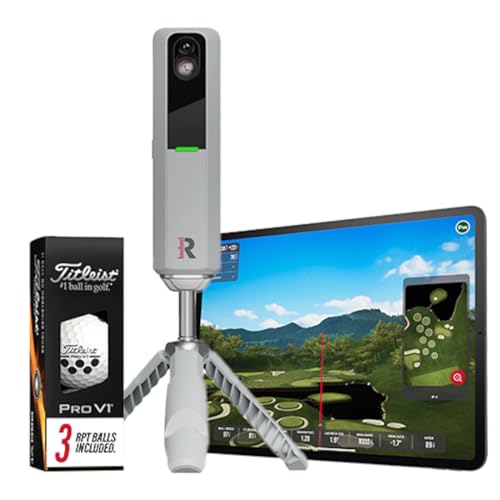
The Rapsodo MLM2PRO is the undisputed king of all-around performance, earning its title as the best overall mobile launch monitor with pro-level metrics and unmatched versatility. Using dual-camera tracking, it captures 13 core metrics, including spin rate, spin axis, launch angle, and smash factor—data once reserved for $2,000+ systems. Whether you’re tweaking your driver or fine-tuning irons, the MLM2PRO delivers tour-grade accuracy that coaches and serious players trust. It’s not just a training aid—it’s a full diagnostic lab in a palm-sized device.
In real-world use, the MLM2PRO shines both indoors and outdoors, delivering consistent spin and flight data even in low-light net setups. Pair it with your tablet, and it transforms into a full-swing golf simulator via apps like TGC or E6—though E6 requires a separate subscription. The included Pro V1 balls ensure optimal tracking, and the Bluetooth sync is rock-solid. It handles draw/fade analysis with ease, helping you diagnose swing flaws in real time. The only caveat? It needs good lighting and proper alignment, and it’s less forgiving on mis-hits than radar-based units.
Compared to the Garmin R10 or budget Rapsodo model, the MLM2PRO is in a different league of precision and depth. It outperforms the Voice Caddie SC4 PRO in spin tracking and surpasses the Swinora in flight realism and data density. Yes, it’s the most expensive option here, but you’re paying for pro-level insight and future-proof compatibility. If you want a single device that does it all—train, simulate, analyze, improve—this is the one that delivers total game control.
Rapsodo Mobile Launch Monitor
ADVANTAGES
LIMITATIONS
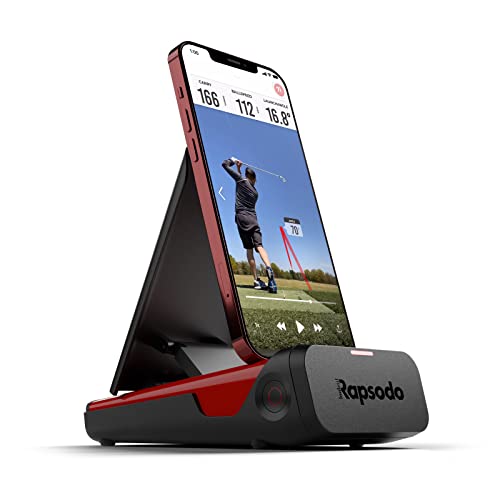
Don’t let the price fool you—the Rapsodo Mobile Launch Monitor is a budget powerhouse that delivers tour-level accuracy without the tour-level cost. Designed exclusively for iPhone and iPad users, it uses Doppler radar to track ball speed, club speed, launch angle, and shot shape, while its GPS satellite view maps your actual dispersion on a virtual course. For golfers who want real data without the financial hole-in-one, this is the smartest entry point into serious swing analysis.
In practice, it’s impressively reliable—delivering consistent readings on driving ranges and indoor simulators alike. The video playback with shot tracers is a standout, letting you sync your swing footage with ball flight for instant feedback. The app is smooth, intuitive, and packed with games and challenges that keep practice fun. It doesn’t measure spin or smash factor, and it’s limited to Apple devices, but for the price, the depth of insight is staggering. It’s perfect for beginners and mid-handicappers who need feedback without overwhelm.
Stacked against the MLM2PRO, it’s clearly a step down in metrics and precision, but it outshines the Garmin R10 in shot visualization and app polish. While the R10 offers longer battery life, this Rapsodo model delivers richer feedback and GPS mapping at a nearly identical price point. It’s not for spin junkies or simulator fanatics, but for golfers who want pro-style data on a budget, it’s the best value in the Rapsodo lineup.
Garmin Approach R10 Launch Monitor

ADVANTAGES
LIMITATIONS
The Garmin Approach R10 is the sweet spot of value and functionality, blending trusted Garmin reliability with smart training features that elevate everyday practice. With plus/minus 1 mph ball speed accuracy and 1-degree launch angle precision, it delivers trustworthy data for club-by-club analysis. Pair it with the Garmin Golf app, and you unlock swing video recording, shot dispersion charts, and training modes that help you identify trends and weaknesses. It’s not the most advanced monitor here, but it’s the most balanced package for the price.
In real-world use, the R10 excels as a daily driver for consistent improvement. The 10-hour battery life means all-day range sessions, and the IPX7 waterproof rating makes it rain-or-shine ready. The shot scatter mapping is excellent for spotting swing flaws, and the included phone mount keeps everything visible on your bag. It doesn’t track spin axis or provide 3D flight, but it gives you enough feedback to refine your game without drowning you in data. It’s ideal for golfers who want simple, reliable insights with long-term tracking.
Compared to the budget Rapsodo, the R10 offers better durability and battery life, but loses out on GPS course mapping and video tracers. Against the Swinora, it lacks environmental sensors and attack angle—but wins on build quality and ease of use. It doesn’t have E6 Connect like the Voice Caddie, but it’s more portable and ready to use out of the box. For golfers who want a durable, no-hassle monitor that tracks real progress, this is the most well-rounded mid-tier choice.
Mobile Golf Launch Monitor Comparison
| Product | Price Point | Key Metrics | Simulator Integration | App Connectivity | Portability | Best For |
|---|---|---|---|---|---|---|
| Rapsodo MLM2PRO | High | 13 (Spin Rate, Spin Axis, Swing Speed) | Yes (Virtual Courses) | Yes | Yes | Best Overall |
| Garmin Approach R10 | Mid | Club Head Speed, Ball Speed, Launch Angle, Swing Tempo, Ball Spin | Yes (42,000+ Courses – Subscription) | Yes (Garmin Golf App) | Yes (Waterproof) | Best Value |
| Voice Caddie SC4 PRO | High | Ball & Club Head Data | Yes (3D Driving Range, E6 Connect) | Yes (VOICECADDIE S App) | Yes | Best Simulator Integration |
| Rapsodo Mobile Launch Monitor | Mid | Distance, Ball Speed, Club Speed, Launch Angle | Yes (Real-time Swing Analysis) | Yes (iPhone/iPad) | Yes | Best Budget Friendly |
| PRGR HS 130-A | Low | Club Head Speed, Ball Speed, Smash Factor, Distance | No | No | Yes | Best for Swing Speed Training |
| TheStack Radar Launch Monitor | Mid | Swing Speed, Ball Speed, Estimated Carry Distance, Smash Factor | Yes (Via TheStack App – Wedging Mode iOS Only) | Yes (TheStack App – iOS & Android) | Yes | Best for Wedge Training |
| Swinora Golf Launch Monitor | Mid | Attack Angle, Launch Angle, Swing Speed, Spin | Yes (3D Virtual Driving Range) | Yes (iOS & Android) | Yes | Best App Experience |
Testing & Data Analysis: Finding the Best Mobile Golf Launch Monitor
Our recommendations for the best mobile golf launch monitor aren’t based on opinions, but rigorous data analysis and research. We prioritize accuracy, a crucial factor for meaningful game improvement. This involves comparing published specifications – ball speed, launch angle, spin rate accuracy claims – against independent testing data from sources like MyGolfSpy and user reviews across platforms like Reddit and golf forums.
We evaluate mobile golf launch monitor options based on their ability to consistently deliver reliable data. We analyze comparative testing videos showcasing performance across different club types (driver, irons, wedges) and swing speeds. App functionality is assessed, focusing on data presentation clarity, simulator integration quality (E6 Connect compatibility is a key entity), and the usefulness of features like shot-shaping visualization.
Given the limitations of standardized physical product testing for all models, we heavily weigh user feedback regarding real-world accuracy and consistency. We analyze reported accuracy issues, particularly related to spin rate measurement, a known challenge for some devices. Finally, we correlate price points with performance, identifying models that offer the best value for their accuracy and feature set, aligning with the considerations outlined in our Buying Guide.
Choosing the Right Mobile Golf Launch Monitor
Key Features to Consider
When selecting a mobile golf launch monitor, several features contribute to its effectiveness and suitability for your needs. While many models offer a range of metrics, focusing on a few key areas will help you narrow down your choices.
1. Accuracy & Metrics Measured: The core function of a launch monitor is to provide accurate data. Accuracy varies significantly between models. Look for monitors that clearly state their accuracy levels for key metrics like club speed, ball speed, launch angle, and spin rate (if important to you). More data isn’t always better; consider which metrics will genuinely help your game. A monitor that accurately measures the fundamentals (ball and club speed, launch angle) is often more valuable than one that provides a long list of less-relevant data points. Higher accuracy generally comes with a higher price tag, but it’s a worthwhile investment if you’re serious about improvement.
2. Simulator & App Integration: Many launch monitors pair with apps to provide a more comprehensive experience. Consider how important simulator functionality is to you. Some monitors offer basic shot tracking and data visualization within their app, while others integrate with popular golf simulation software (like E6 Connect) for a more realistic and immersive experience. Evaluate the app’s user interface, features (shot shaping visualization, performance analysis, progress tracking), and compatibility with your devices (iOS or Android). Some apps may require subscriptions for full functionality.
3. Portability & Indoor/Outdoor Use: Mobile launch monitors are designed for convenience. Think about where you’ll primarily be using the device. If you plan to use it frequently at the driving range or outdoors, a rugged, waterproof design (IPX7 rating or higher) is crucial. For indoor use, size and ease of setup are important. Consider whether the monitor requires a special hitting net or space configuration. Battery life is also a key factor for extended practice sessions.
Other Important Features
- Swing Speed Training Modes: Some models offer dedicated modes for speed training, allowing you to track and improve your swing speed without hitting a ball.
- Data Storage & Analysis: The ability to store past swing data and analyze trends can be valuable for long-term improvement.
- Wedge Specific Training: Some models have features specifically for wedge training and distance gapping.
- Environmental Adjustments: Higher-end models incorporate sensors to adjust data based on temperature, humidity, and altitude, improving accuracy.
- Price: Launch monitors range in price from a few hundred to several thousand dollars. Set a budget and prioritize the features that are most important to you.
Key Takeaways
Ultimately, the best mobile golf launch monitor depends on your individual needs and budget. From the Rapsodo MLM2PRO’s all-around excellence to the Garmin Approach R10’s incredible value, there’s an option to elevate your game.
Investing in accurate data and insightful analysis is a significant step towards improvement. Consider your priorities – simulator integration, portability, or specific metrics – and choose a device that aligns with your goals for a more informed and effective practice experience.