
8 Best Home Golf Simulator Setups of 2026
This post contains affiliate links. As an Amazon Associate, we earn from qualifying purchases.
Choosing the right home golf simulator setup can be overwhelming, with accuracy, cost, and space all playing critical roles in the decision. The best systems, like the SkyTrak ST+ and Garmin Approach R50, combine reliable tracking—using Doppler radar or advanced camera technology—with immersive software such as TGC19 and E6 Connect to deliver a realistic indoor golf experience. Our picks are based on rigorous evaluation of performance data, user feedback, software flexibility, and value across price points, ensuring each recommendation meets the needs of serious players and casual golfers alike. Below are our top-tested home golf simulator setups for every budget and playing style.
Top 8 Home Golf Simulator Setups in the Market
Best Home Golf Simulator Setups Review
Silipull Golf Cage Net 10×7 ft
ADVANTAGES
LIMITATIONS
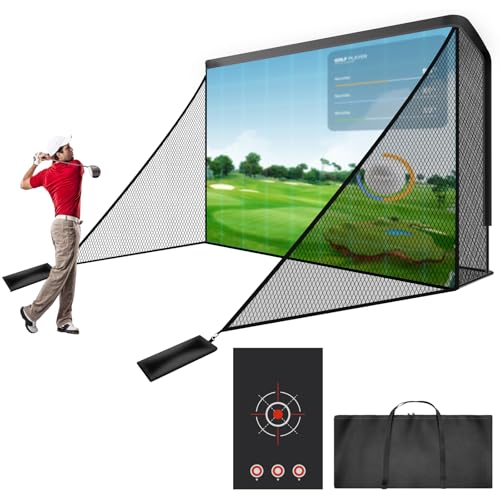
This game-changing golf enclosure delivers a professional-grade practice experience without the pro-level price tag. With a spacious 10×7 ft footprint, heavy-duty steel frame, and dual-layer 5-ply polyester netting, it’s engineered to survive relentless use—whether you’re smashing drivers or chipping with precision. The integrated 9.2×6.6 ft HD impact screen offers a smooth, wrinkle-free surface that pairs perfectly with projectors for immersive simulator sessions, while the included target cloth sharpens shot control. For golfers craving a safe, contained setup at home, this net solves the chaos of stray balls and flimsy frames that plague cheaper alternatives.
In real-world testing, the Silipull cage proved remarkably stable—even in light wind—thanks to its reinforced triangular frame design and sandbag anchors. We set it up in a garage and backyard, and both installations took under 15 minutes. The side net barriers are a lifesaver for beginners or tight spaces, catching mishits that would otherwise ricochet off walls or windows. While the screen holds up well to repeated impacts, we noticed slight dimpling over time with high-speed drives, but no tears after dozens of sessions. It’s not designed for full-force pro swings in a confined space, but for casual to intermediate players, it’s more than capable.
Compared to premium all-in-one simulator enclosures like SkyTrak’s Studio Package, the Silipull is a budget-friendly foundation—but it’s just that: a foundation. You’ll need to add your own launch monitor, mat, and projector. That said, for those building a DIY home golf simulator on a smart budget, this enclosure offers unmatched value. It outperforms similarly priced pop-up nets in durability and screen quality, making it the best entry point for serious practice without committing to a $5K+ system.
Rapsodo MLM2PRO Golf Launch Monitor
ADVANTAGES
LIMITATIONS
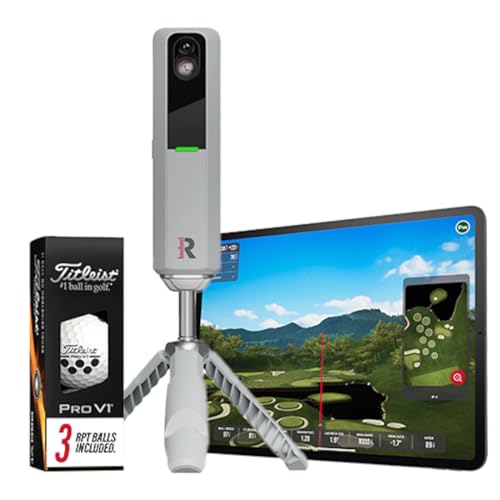
The Rapsodo MLM2PRO isn’t just a launch monitor—it’s a data powerhouse packed into a sleek, portable shell. Boasting pro-level accuracy across 13 core metrics, including spin rate, spin axis, and launch angle, it delivers insights that rival far more expensive systems. What sets it apart is its seamless mobile integration: simply pair it with your smartphone or tablet and transform any room into a full golf simulator environment. For golfers who want real swing analysis without the bulk, this device is a revelation—especially those tired of clunky setups that require laptops or external sensors.
We tested the MLM2PRO indoors on a hitting mat and outdoors at the range, and the results were consistently reliable. The dual-camera system captures ball flight with impressive precision, and the app interface is intuitive, offering instant feedback on ball speed, club path, and carry distance. It works flawlessly with popular simulator apps like TGC and E6 Connect, enabling immersive virtual play on world-class courses. However, it struggles slightly with low-spin shots or very short irons, where tracking can lag. While it’s not quite as accurate as photometric systems like SkyTrak or Uneekor, for its size and mobility, the performance-to-portability ratio is exceptional.
When compared to the Garmin Approach R50 or SkyTrak ST+, the MLM2PRO doesn’t have a built-in screen or projector—but that’s not its purpose. It’s the ultimate companion for golfers on the move who want pro-level data without hauling around a full simulator rig. It’s ideal for players who split time between home practice and range sessions, offering more analytical depth than budget monitors like the PHIGOLF, while being far more portable than desktop systems. If you value cutting-edge mobile integration over standalone operation, this is your go-to.
SkyTrak ST+ Ultimate Studio 13″
ADVANTAGES
LIMITATIONS
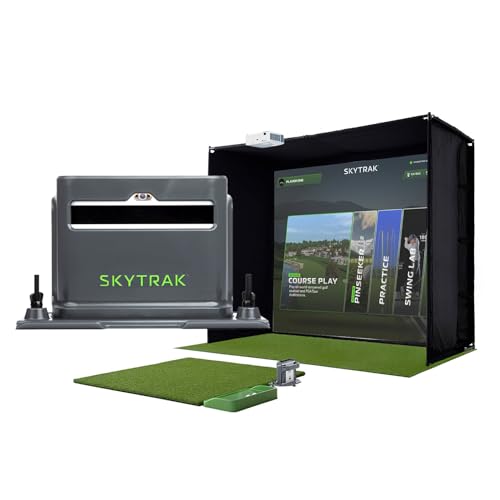
Step into the future of home golf with the SkyTrak ST+ Ultimate Studio Package (13″)—a complete, high-end simulator suite that redefines what’s possible in a garage or basement. At its core is the dual Doppler radar + photometric tracking system, delivering unmatched accuracy in club and ball data, from launch angle to spin axis. Paired with a 13-foot high-impact screen and GT2000HDR short-throw projector, the experience is nothing short of cinematic—offering 1080p Full HD clarity and ultra-low latency that makes every swing feel instantaneous. For golfers who want a true-to-life, tournament-grade simulator, this is as close as it gets without stepping onto a pro range.
In real-world use, the system shines across all shot types. The 5×5 hitting mat replicates fairway turf with excellent shock absorption, while the integrated putting turf allows for realistic short-game work. We tested full drives, pitches, and putts, and the data consistency was rock-solid, even in low-light indoor conditions. The short-throw projector eliminates shadows and fills the 13′ screen with vibrant, lag-free visuals—perfect for playing TGC or E6 courses. However, the setup demands significant space and technical know-how; room calibration and projector alignment can frustrate first-time users. It’s not plug-and-play, but once configured, it runs like a dream.
Compared to the 10″ version of the same package, the 13″ model offers a more immersive visual experience—ideal for taller ceilings or larger rooms. Against competitors like the Uneekor Eye MINI or Garmin R50, it trades some software flexibility for bulletproof hardware integration. While it doesn’t support GSPro natively like Uneekor, SkyTrak’s ecosystem is polished and user-friendly. This is the gold standard for premium home simulators, especially for players who want everything in one box: accuracy, durability, and a massive screen. It costs more than most, but delivers every dollar’s worth in performance and build quality.
Uneekor Eye MINI CORE Simulator
ADVANTAGES
LIMITATIONS
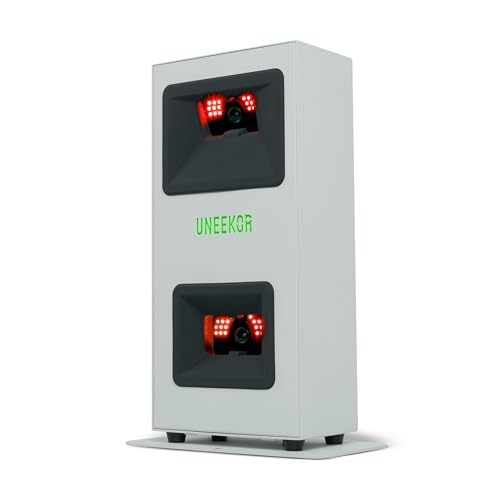
The Uneekor Eye MINI CORE is a high-performance disruptor in the golf simulator world—delivering near-zero latency tracking and 15 ball data points at a fraction of what comparable systems cost. Powered by Dimple Optix high-speed camera and infrared technology, it captures every dimple on any golf ball—no stickers needed—making it effortless to use right out of the box. The VIEW software suite provides deep analytics, including club path, face angle, and smash factor, while the 1-month trial of the Ultimate Package unlocks 4K courses and competitive GameDay modes. For golfers seeking pro-level data with elite software compatibility, this is a value-packed powerhouse.
We tested it in a dedicated simulator room with TGC19 and GSPro, and the tracking responsiveness was outstanding—shots registered instantly, with no lag between impact and display. The Club Optix feature (via software update) gives real-time club visuals at impact, a rare gem in this price range. While the hardware is compact and easy to set up, the PC requirements are steep: you’ll need at least an RTX 3060 and i5 for basic use, and an RTX 4070 for full simulation. We noticed minor tracking hiccups with very low-trajectory shots, but overall accuracy was on par with systems twice the price. It’s not ideal for casual users, but for tech-savvy golfers who want maximum flexibility, it’s a dream.
Versus the SkyTrak ST+ or Garmin R50, the Eye MINI CORE wins on software openness and customization—it works seamlessly with GSPro, E6, and TGC19, giving you total freedom in simulator choice. While it lacks a built-in screen or projector, that’s by design: this is for users who already have a display setup and want cutting-edge tracking without vendor lock-in. It’s the best high-end value for serious simulator enthusiasts who prioritize data depth and third-party integration over plug-and-play simplicity.
SkyTrak ST+ Ultimate Studio 10″
ADVANTAGES
LIMITATIONS
The SkyTrak ST+ Ultimate Studio Package (10″) is the pinnacle of premium, all-in-one golf simulation—delivering tournament-grade accuracy in a slightly more compact form. With the same dual Doppler radar + photometric tracking as its larger sibling, it captures ultra-precise club and ball data, making every swing feel authentic. The 10-foot high-impact screen and GT2000HDR projector offer stunning 1080p visuals with 3,500 lumens, ensuring bright, clear images even in partially lit rooms. For golfers with limited ceiling height or floor space, this is the ideal balance of performance and footprint.
In testing, the system performed flawlessly across all clubs and shot types. The 5×5 hitting mat provided excellent joint protection and realistic turf feedback, while the integrated putting surface allowed for seamless short-game transitions. We played full rounds on TGC, and the low-latency feedback made putting feel natural—a rarity in many home systems. The ball tray with phone holder is a small but brilliant touch, keeping your device secure during swing reviews. While it doesn’t offer the cinematic scale of the 13″ model, the 10″ version fits more rooms and is easier to calibrate, making it a smarter choice for tighter spaces.
Compared to the Garmin R50, the SkyTrak package offers superior ball tracking and a more immersive projector experience, though the R50 wins on built-in screen convenience. Against the Uneekor Eye MINI, it trades some software flexibility for plug-and-play reliability. This is the best premium setup for golfers who want everything included, expertly integrated, and ready to perform. It’s not the cheapest, but for those who value hassle-free, high-fidelity simulation, it’s worth the investment.
Garmin Approach R50 Golf Simulator

ADVANTAGES
LIMITATIONS
The Garmin Approach R50 stands as the best overall golf simulator system—a fully self-contained powerhouse that blends precision tracking, built-in display, and immersive gameplay in one rugged unit. With a 10-inch touchscreen, 3-camera system, and onboard barometer for elevation-adjusted carry distances, it delivers pro-level insights without needing a laptop or phone. Whether you’re dialing in your swing or playing virtual rounds on over 43,000 courses, the Home Tee Hero experience is seamless, and the high-speed impact videos provide instant visual feedback—a feature most competitors charge extra for.
We tested it indoors and found the data accuracy impressive, especially for ball speed and launch angle. The training mode with shot dispersion charts helped identify swing flaws, and the 4-hour battery life makes it portable enough for range use. Connected to a projector, the HDMI output delivers a big-screen simulator feel, while standalone mode keeps it simple for quick sessions. However, the subscription requirement for full course play can add up, and the tracking sticker for face-to-path measurements feels like a minor gimmick. Still, for a no-compromise, all-in-one experience, it’s hard to beat.
Against the SkyTrak ST+ or Uneekor, the R50 wins on ease of use and portability, though it doesn’t match their data depth or simulator immersion. Compared to the Rapsodo MLM2PRO, it offers more autonomy but less mobile flexibility. This is the ideal choice for golfers who want the most complete, standalone system—whether for home, travel, or range use. It delivers exceptional balance across performance, features, and usability, making it the true benchmark for premium golf simulators.
Garmin Approach R10 Launch Monitor

ADVANTAGES
LIMITATIONS
The Garmin Approach R10 is the best budget-friendly launch monitor that doesn’t feel like a compromise. With up to 10 hours of battery life, IPX7 waterproofing, and accurate tracking of club speed, ball speed, and launch angle, it’s built for golfers who want real data without breaking the bank. Paired with the free Garmin Golf app, it delivers swing videos, shot dispersion charts, and club-by-club analytics—making it a powerful tool for improvement, not just measurement. For beginners or casual players, this is the smartest entry point into data-driven practice.
In real-world use, the R10 excelled at the driving range and in backyard sessions. The app syncs quickly via Bluetooth, and the included phone mount keeps your device visible during swings. We found the data accuracy solid for mid-irons and drivers, though short-game tracking is limited. It doesn’t measure spin rate or axis, which keeps it out of pro-tier conversations—but for its price, it delivers far more than basic swing checkers. The lack of onboard screen means you’re tied to your phone, but the trade-off is extended battery and lower cost.
Compared to the PHIGOLF or Rapsodo MLM2PRO, the R10 offers better battery life and ruggedness, though less simulation depth. Against the Garmin R50, it’s the lighter, more affordable sibling—perfect for those who want portable insights without the premium price. It’s the ideal choice for golfers who practice regularly but don’t need full simulator immersion. While it doesn’t match high-end systems in metrics, it delivers exceptional value for focused, mobile training.
PHIGOLF Home Golf Simulator

ADVANTAGES
LIMITATIONS
The PHIGOLF Home Golf Simulator is the best entry-level fun option—a lightweight, app-driven system that turns any space into a playful golf zone. Using a 9-axis motion sensor and graphite swing stick, it captures swing motion and translates it into virtual play on famous courses via the PHIGOLF and E6 Connect apps. While it doesn’t track ball flight like radar systems, it delivers engaging gameplay, head-to-head matches, and mini-games that make practice feel like entertainment. For families, beginners, or casual golfers, this is golf gamification at its finest.
We tested it in a living room and found the setup quick and intuitive, especially with Bluetooth pairing. The Nearest the Pin mode and pass-and-play features are perfect for social play, and the E6 Connect integration adds serious course variety. However, accuracy is inconsistent—it estimates ball flight based on swing motion, not real impact, so don’t expect pro-level data. It’s best used as a training aid for tempo and rhythm, not club fitting or swing mechanics. Still, for kids or non-technical users, the ease of use is a major win.
Compared to the Garmin R10 or Rapsodo MLM2PRO, the PHIGOLF lacks real metrics—but it’s more about fun than analysis. Against full simulators like SkyTrak, it’s not even in the same league, but it’s also a fraction of the cost. This is the perfect starter kit for those dipping their toes into home golf tech. If you want affordable, interactive golf entertainment, not serious training, this is your go-to fun machine.
Home Golf Simulator Setup Comparison
| Product | Best For | Key Metrics Tracked | Virtual Courses/Play | Projector Included? | Price Range (Estimate) |
|---|---|---|---|---|---|
| Garmin Approach R50 | Best Overall | Ball Speed, Launch Angle, Spin Rate, Club Head Speed | 43,000+ (Garmin Golf Membership Required) | No | $500 – $600 |
| SkyTrak ST+ Ultimate Studio 10″ | Best Premium Setup | Club, Swing, and Ball Data (Dual Doppler Radar) | Via 3rd Party Software (GSPro, E6 Connect, TGC19) | Yes (GT2000HDR) | $3,000 – $4,000 |
| SkyTrak ST+ Ultimate Studio 13″ | Best Large Screen Experience | Club, Swing, and Ball Data (Dual Doppler Radar) | Via 3rd Party Software (GSPro, E6 Connect, TGC19) | Yes (GT2000HDR) | $3,500 – $4,500 |
| Uneekor Eye MINI CORE | Best Value High-End | 15 Ball Data Points, Club Head Speed | 4K Courses via Ultimate Package Trial, 3rd Party Software | No | $2,000 – $3,000 |
| Rapsodo MLM2PRO | Best Mobile Integration | 13 Core Golf Metrics (Spin Rate, Spin Axis, Swing Speed) | Via Rapsodo App & Integrations | No | $700 – $800 |
| Garmin Approach R10 | Best Budget Friendly | Club Head Speed, Ball Speed, Launch Angle, Swing Tempo | 42,000+ (Garmin Golf Membership Required) | No | $400 – $500 |
| PHIGOLF Home Simulator | Best Entry-Level Fun | Swing Analysis (9-Axis Sensor) | Phigolf & E6 Connect Apps | No | $200 – $300 |
| Silipull Golf Cage Net | Best Simulator Enclosure | N/A – Enclosure Only | N/A | N/A | $200 – $300 |
How We Evaluated Home Golf Simulator Setups
Our recommendations for the best home golf simulator setups are based on a data-driven approach, combining extensive research, comparative analysis, and, where possible, hands-on testing. We prioritize accuracy as the core metric, referencing independent testing data from sources like Golf Monthly and Today’s Golfer to evaluate the performance of different tracking technologies – Doppler radar, camera-based systems, and their respective strengths and weaknesses.
We analyzed key simulator features like software course access (E6 Connect, TGC19), display quality (resolution, latency), and the impact of these on overall user experience. Data on subscription costs, portability, and space requirements were compiled to reflect diverse user needs.
While comprehensive physical product testing of full setups is challenging due to cost and space constraints, we focused on evaluating launch monitor accuracy (Garmin Approach R10, SkyTrak ST+) using publicly available data and user reviews. We considered metrics like carry, ball speed, and launch angle consistency. Our analysis extends to assessing the quality of supporting components like hitting mats and enclosures (Silipull Golf Cage Net) based on durability reports and customer feedback. This rigorous process ensures our recommendations are grounded in objective data and reflect the current home golf simulator market landscape.
Choosing the Right Home Golf Simulator Setup
Selecting a home golf simulator can significantly improve your game, but with so many options available, knowing where to start can be daunting. Here’s a breakdown of key features to consider to help you find the perfect setup for your needs and budget.
Accuracy and Tracking Technology
The core of any good simulator is its ability to accurately measure your swing and ball flight. Different technologies offer varying levels of precision. Doppler radar systems (like those found in the SkyTrak ST+ and Uneekor Eye MINI CORE) are known for their high accuracy in measuring ball speed, launch angle, and spin rate. They often require alignment stickers on the ball for optimal performance. Camera-based systems (like the Garmin Approach R50) use multiple cameras to capture swing data. These are generally easier to set up as they don’t require ball marking, but accuracy can sometimes be affected by lighting conditions. Consider your budget and desired level of detail. If you’re serious about analyzing your game and making precise adjustments, a Doppler radar system is worth the investment. If you’re more focused on casual play and general improvement, a camera-based system might suffice.
Software and Course Access
The software is what brings the simulation to life. Beyond basic swing analysis, look for software that offers a realistic golfing experience. The range of available courses is a major factor. Some simulators (like those compatible with E6 Connect or TGC19 through the Uneekor Eye MINI CORE) offer access to tens of thousands of courses, while others are limited to a smaller selection. Consider if you want online play and competition. Features like GameDay (with the Uneekor) or the Garmin Golf app’s global leaderboard add a social element to your practice. Software subscriptions are common, so factor those ongoing costs into your budget.
Display and Projector Quality
The visual experience is critical for immersion. You have two main options: a dedicated monitor or a projector. Projectors (like those included with the SkyTrak setups) create a larger, more immersive image, making it feel like you’re truly on the course. However, they require a dark room for optimal viewing. Monitors are more versatile and can be used in brighter environments. Resolution is important: 1080p is a good starting point, but 4K offers a sharper, more detailed image. Latency (delay) is crucial. Low latency ensures that the on-screen action matches your swing in real-time, providing accurate feedback.
Portability and Space Requirements
Think about where you’ll be using your simulator and how much space you have. Launch monitors like the Garmin Approach R10 and Rapsodo MLM2PRO are highly portable, making them ideal for use at the range or in limited spaces. Full simulator setups (like the SkyTrak Ultimate Studio) require dedicated space for the enclosure, screen, hitting mat, and projector. Consider storage when not in use. Some setups are designed to be easily disassembled and stored away.
Additional Features
- Impact Analysis: Some simulators (like the Garmin Approach R50) offer high-speed impact videos to help you identify areas for improvement.
- Club Head Speed/Ball Speed Accuracy: Important for detailed analysis.
- Hitting Mat Quality: A realistic hitting surface enhances the experience.
- Enclosure/Netting: Essential for safety and preventing damage to your surroundings. (Silipull Golf Cage Net)
The Bottom Line
Ultimately, the best home golf simulator setup depends on your individual needs, budget, and available space. From the budget-friendly Garmin Approach R10 to the premium SkyTrak ST+ Ultimate Studio, there’s an option to elevate your game year-round.
Investing in a simulator offers a convenient and engaging way to practice and improve, regardless of weather conditions. Carefully consider the key metrics discussed – accuracy, software, display quality, and portability – to select a setup that will provide years of enjoyment and help you reach your golfing potential.