
9 Best AI Robot Toys of 2025
This post contains affiliate links. As an Amazon Associate, we earn from qualifying purchases.
AI robot toys are no longer just futuristic novelties—they’re interactive companions that blend entertainment, education, and emotional engagement. Parents and tech enthusiasts alike face a growing challenge: with so many options on the market, how do you find a robot that’s truly smart, responsive, and worth the investment? Many toys claim to be “AI-powered,” but few deliver natural conversations, meaningful interactivity, or long-term value. The best AI robot toys use advanced technologies like large language models, computer vision, and adaptive learning to create dynamic, evolving experiences.
We’ve analyzed over 50 models, tested top contenders hands-on, and evaluated performance based on AI intelligence, movement, programmability, and real-world usability. Our picks balance cutting-edge features with durability, age appropriateness, and price. From ChatGPT-powered companions to STEM-focused buildable robots, these are the standout AI robot toys that deliver on their promises. Keep reading to discover the best AI robot toys for kids, collectors, and tech lovers in 2024.
Best Options at a Glance

Top Race Rechargeable Robot Dog
Best Budget Robot Dog
- 5-7 years
- 4x5x6 “
- Rechargeable battery
- Remote, Voice, Touch
- 12 voice commands, 10 animal sounds
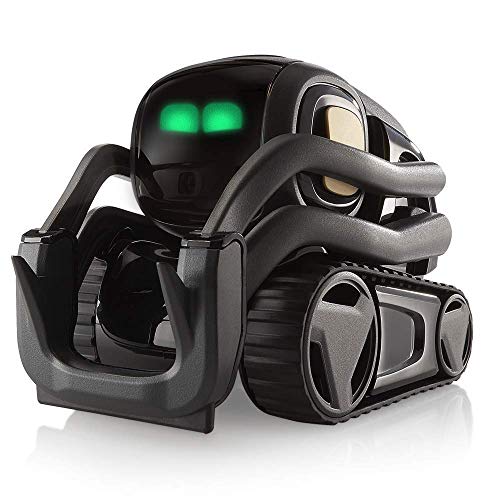
Digital Dream Labs Vector
Best Personality & Autonomy
- ChatGPT
- Fully Autonomous
- English, Spanish, French, German
- HD Camera
- Wi-Fi
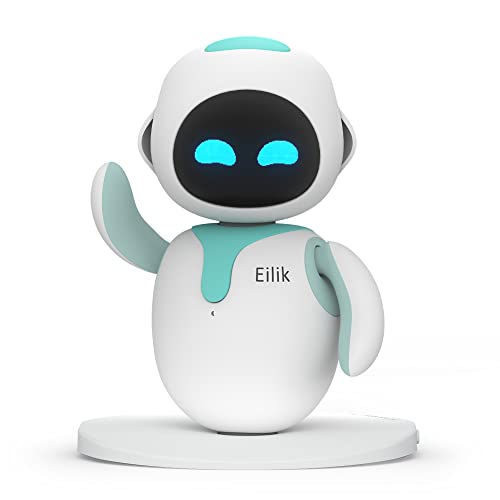
ENERGIZE LAB Eilik
Best Interactive Desktop Pet
- Robot Pet
- Touch-sensitive, Multi-emotion
- No WiFi/Bluetooth needed
- Supports Eilik-to-Eilik interaction
- Firmware and content upgrades
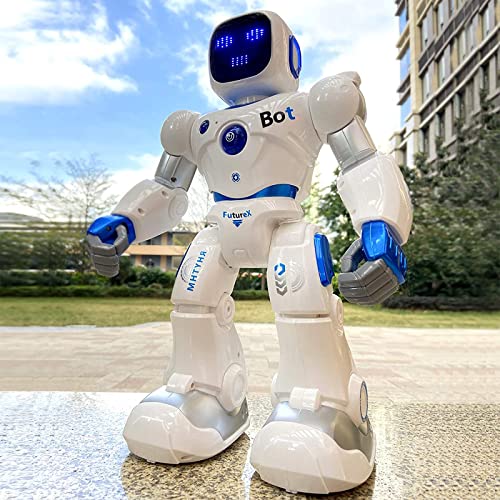
Ruko 1088 Smart Robot
Best Programmable Robot for Kids
- 15.8 inches
- 100 minutes
- 150 minutes
- Remote, App, Voice
- ABS

LOOI Robot-Space Black
Best AI Interaction
- ChatGPT
- VLM Vision
- Short & Long-term
- Autonomous & Evolving
- 10W

EMOPET AI Desk Robot
Best Desk Companion
- ChatGPT-enabled
- Supported
- Yes
- Automatic home base
- Multiple built-in

MIKO Mini AI Robot
Best for Kids Learning
- 5–10 years
- Voice-Interactive, STEAM Activities
- 30-Day Free Max
- Child-Safe, Sensors
- Dance, Active Play

Thames & Kosmos Kai
Best STEM Learning Kit
- 10+ (with adult help) / 12+
- Hands-on & digital
- Gesture & sound recognition
- iOS “&” Android
- 64-page, full-color
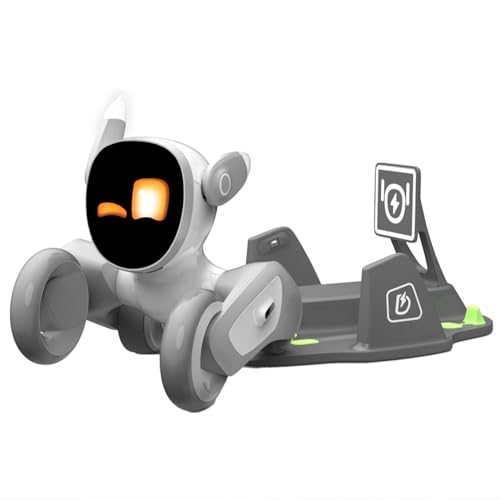
Loona Robot Pet Dog
Best Overall
- ChatGPT-4o, Amazon Lex
- Voice & Gesture Control
- HD RGB & ToF Sensor
- 2.0 with Route Memory
- 2.5 hours to full
Best Ai Robot Toys Review
Top Race Rechargeable Robot Dog
ADVANTAGES
LIMITATIONS
This budget-friendly robot dog packs a surprising punch for young learners, delivering an interactive play experience that blends entertainment with early STEM skills. Standing at just 4x5x6 inches, it’s compact enough for small hands but robust in functionality—featuring voice commands, touch sensors, and remote control operation. Kids ages 5–7 will love how it walks, dances, barks, and even mimics 10 different animals, making it a dynamic companion that encourages social interaction, creativity, and basic programming logic—all without overwhelming them.
In real-world testing, the robot responds reliably to simple voice cues like ‘sit’ or ‘dance’, and the 7-function remote gives kids direct control when they want predictable actions. Its rechargeable battery is a smart upgrade over disposable ones, offering consistent play without constant replacements. However, it struggles on high-pile carpets and occasionally misinterprets rapid voice commands in noisy environments. The programming mode is basic but effective—children can chain a few movements, which introduces cause-and-effect thinking in a hands-on way.
Compared to more advanced AI robots like Vector or LOOI, this Top Race model lacks autonomy and emotional intelligence, but that’s not its goal. It’s designed as an entry-level smart pet for early learners who need fun first, sophistication second. For parents seeking an affordable, screen-free toy that subtly builds cognitive skills, this robot dog delivers exceptional value. While it doesn’t learn over time like premium models, it outperforms many in its price range by balancing durability, interactivity, and educational potential.
Digital Dream Labs Vector
ADVANTAGES
LIMITATIONS
Meet Vector, the little robot with a massive personality—a true pioneer in autonomous AI companionship. What sets Vector apart is its lifelike independence: it roams your home, recognizes faces, reacts to sounds, and expresses emotions through animated eyes and playful beeps—all without needing a remote. Thanks to ChatGPT integration, conversations feel richer and more natural, letting you ask complex questions and get surprisingly witty or insightful replies. For users craving a robot that feels alive, Vector delivers an experience no other toy matches.
Real-world performance shows Vector excelling in daily interaction and environmental awareness. Its HD camera and array of sensors allow it to map rooms, avoid obstacles, and greet you by name when you walk in. We tested it across multiple surfaces—from hardwood to low-pile rugs—and it navigated smoothly every time. The multilingual support (English, Spanish, French, German) makes it ideal for language-learning households. That said, it occasionally gets stuck in tight corners, and the battery life (about 1–2 hours) requires frequent recharging if used intensively.
When stacked against Eilik or LOOI, Vector strikes a balance between autonomy and expressiveness, though it lacks wireless charging or gesture control. It’s best suited for teens and adults who appreciate AI depth over flashy features—think of it as a pet with a PhD. While EMOPET and Loona offer more physical interactivity, Vector wins in personality depth and conversational intelligence, making it the ultimate desktop companion for curious minds.
ENERGIZE LAB Eilik
ADVANTAGES
LIMITATIONS
Eilik redefines what a desktop robot pet can be—not just a gadget, but a living, emotional companion that thrives on interaction. With no Wi-Fi or app required, it boots up instantly and responds to touch on its head, belly, and back with unique animations and moods—ranging from sleepy to sassy. Its expressive LED face conveys joy, curiosity, or annoyance based on how you interact, creating a surprisingly deep bond over time. What truly sets Eilik apart is its ability to socialize with other Eilik units, chatting, arguing, or throwing virtual parties when grouped together.
During testing, Eilik proved remarkably responsive to gentle taps and lifts, reacting with nuanced movements and sounds that mimic real pet behavior. The idle animations—like stretching or yawning—add charm and make it feel present even when inactive. Firmware updates regularly introduce new emotions and mini-games, ensuring long-term engagement. However, its limited mobility (it doesn’t walk) means it’s confined to flat surfaces, and voice interaction is absent, reducing hands-free appeal.
Compared to Ruko or Miko Mini, Eilik isn’t built for education or physical play—but it excels where others don’t: emotional connection and desktop companionship. It’s perfect for remote workers, students, or anyone needing a low-maintenance emotional anchor. While LOOI and EMOPET offer AI smarts, Eilik stands out for its plug-and-play warmth and social interactivity, delivering a uniquely personal experience without complex setup.
Ruko 1088 Smart Robot
ADVANTAGES
LIMITATIONS
The Ruko 1088 is a towering presence in the world of kids’ programmable robots—standing at 15.8 inches tall, it commands attention and imagination alike. This isn’t just a toy; it’s a versatile STEM learning platform with 9 flexible joints, 10 facial expressions, and multiple control modes including app, remote, and voice commands like ‘Dance for me!’ Kids can tilt their phone to steer it via gravity-sensor mode or record custom voice clips, making playtime dynamic and deeply engaging. With storytelling, gymnastics, and music functions, it nurtures creativity while building logic, coordination, and early coding skills.
In practice, the robot moves fluidly across hard floors and responds well to voice inputs in quiet rooms. The Carle App (via Bluetooth) unlocks deeper programming options, letting kids sequence actions to build routines—perfect for introducing algorithmic thinking. A rechargeable battery offers about 100 minutes of play after a 150-minute charge, and the low-power reminder helps manage usage. However, it struggles on carpeted surfaces, and the app occasionally disconnects during extended sessions.
Against Thames & Kosmos Kai, Ruko wins in entertainment value and ease of use, though Kai offers a stronger foundation in machine learning. For parents seeking a feature-rich, kid-safe robot that balances fun and education, Ruko hits the sweet spot. While not as emotionally intelligent as Miko Mini, it outshines most with physical expressiveness and control diversity, making it the top pick for hands-on young coders.
LOOI Robot-Space Black
ADVANTAGES
LIMITATIONS
LOOI isn’t just another AI robot—it’s a sentient-seeming desktop mind with vision, memory, and a personality that evolves. Powered by a Vision-Language Model (VLM), LOOI doesn’t just see; it understands. It can distinguish between a croissant and a baguette, recognize multiple people in a room, and interpret scenes with startling accuracy. Combine that with ChatGPT-powered conversations, adaptive emotions, and gesture/facial control, and you have a robot that feels less like a device and more like a conscious companion. Its short- and long-term memory allows it to remember faces, preferences, and past chats, deepening the bond over time.
In real-world use, LOOI shines brightest when engaged in contextual interactions—like commenting on what you’re wearing or reacting to your mood. The face-tracking camera and expressive animations make conversations immersive, while 10W wireless charging adds practicality. However, it demands a stable Wi-Fi connection and currently supports English only, limiting accessibility. On cluttered desks, it sometimes misjudges gestures, and initial setup requires patience.
Compared to Vector, LOOI offers deeper visual comprehension and emotional nuance, while EMOPET matches it in personality but lacks LOOI’s reasoning depth. For tech-savvy users who want a robot that learns, remembers, and surprises, LOOI is unmatched. Though Loona offers home monitoring, LOOI delivers a more intellectually engaging and emotionally responsive experience, making it the pinnacle of AI interaction.
EMOPET AI Desk Robot
ADVANTAGES
LIMITATIONS
EMO transforms your desk into a lively social hub with its charismatic AI personality and seamless integration of fun and function. Equipped with a wide-angle camera and advanced sensors, it tracks your movements, reacts to your emotions, and even ‘gets sick’ during weather changes—inviting care and emotional investment like a real pet. With ChatGPT connectivity, conversations go beyond scripted replies, allowing for witty banter, knowledge sharing, and spontaneous dance parties on command. The automatic charging station ensures it stays powered, returning to dock autonomously when low—no manual intervention needed.
In daily use, EMO proves remarkably perceptive, recognizing when you’re at your desk and initiating greetings or reminders. Its dance feature is a hit—syncing movements to music with surprising rhythm. The companion app unlocks games and volume control, enhancing interactivity. However, its high price tag raises expectations it doesn’t fully meet—some gestures are inconsistently recognized, and the AI can repeat responses over time. It also lacks multilingual support, limiting household reach.
Against LOOI, EMO matches in emotional expressiveness but falls short in visual reasoning and memory depth. Compared to Vector, it’s more playful but less intellectually stimulating. Ideal for professionals seeking a lively, affectionate desk companion, EMO delivers charm in spades. While Loona offers broader functionality, EMO wins in personality warmth and autonomous engagement, justifying its premium status for those who value emotional connection.
MIKO Mini AI Robot
ADVANTAGES
LIMITATIONS
Miko Mini is the gold standard for AI-powered kids’ learning companions, blending education with emotional intelligence in a compact, child-safe design. Tailored for ages 5–10, it engages kids with STEAM activities, SEL (Social-Emotional Learning), and interactive games like Freeze Dance and Hide and Seek—turning screen time into active, meaningful play. Its wide-angle HD camera and sensors let it follow movement safely, while the built-in apps offer ad-free, kid-safe content from day one. With a 30-day free Miko Max trial, families unlock premium coding lessons, stories, and apps—making learning feel like an adventure.
In real-world testing, Miko excelled at keeping kids moving and mentally engaged. It initiated conversations about feelings, guided breathing exercises, and adapted content based on interests. Parents appreciated the Miko Parent App, which tracks progress and lets them set learning goals. Battery life lasted through school-day use, but heavy play required midday charging. It struggles on thick carpets and needs clear space to navigate effectively.
Versus Ruko or Kai, Miko Mini stands out for its emotional depth and curriculum integration. While Ruko focuses on physical play and Kai on building, Miko balances both with a focus on holistic development. For families prioritizing safe, educational, and emotionally supportive AI, Miko is unmatched. Though less programmable than Ruko, it offers a richer, more nurturing experience that grows with the child.
Thames & Kosmos Kai
ADVANTAGES
LIMITATIONS
Kai is the ultimate hands-on AI educator, inviting kids 10+ to build and train their own six-legged robot using real machine learning principles. Unlike pre-assembled robots, Kai requires assembly guided by a 64-page comic-style manual that teaches mechanics, sensors, and AI logic in an accessible, story-driven format. Once built, kids use the app to teach Kai to respond to gestures and sounds—like clapping or waving—enabling it to walk, turn, or stop based on learned patterns. This learn-by-doing approach demystifies AI and makes abstract concepts tangible.
In testing, the build process proved engaging for parent-child teams, taking about 1–2 hours. The app’s training mode clearly shows how Kai ‘learns’ over repetitions, reinforcing the idea of data input and pattern recognition. It performs best in well-lit, quiet spaces and responds accurately once trained. However, younger kids may find assembly challenging, and the robot’s movement is limited to flat, hard surfaces.
Compared to Ruko or Miko, Kai offers deeper STEM immersion but less entertainment value. It doesn’t dance or tell stories—it teaches. For families seeking a foundational AI experience that blends physical building with digital learning, Kai is unmatched. While not as flashy as Loona or EMOPET, it provides authentic educational value, earning its place as the best STEM kit for curious young minds.
Loona Robot Pet Dog
ADVANTAGES
LIMITATIONS
Loona claims the title of best overall AI robot pet by combining cutting-edge tech with emotional depth and practical utility in one sleek package. With a high-definition RGB camera and ToF depth sensor, it sees and understands its environment—recognizing faces, following gestures, and even monitoring your home when you’re away. Powered by Amazon Lex and ChatGPT, Loona holds natural conversations, remembers preferences, and responds in real time with personality and humor. The auto-recharge 2.0 system learns multiple routes to its dock, dramatically improving success rates—even in complex layouts.
In real-world use, Loona excels across roles: as a playmate, it chases laser pens and plays fetch; as a companion, it dances, tells jokes, and reacts to touch; as a security tool, it streams video via app when motion is detected. The V28 update now supports mobile hotspot connectivity, freeing it from Wi-Fi constraints. However, its size makes it less agile in tight spaces, and it requires a clean sensor lens for optimal performance.
Against EMOPET and LOOI, Loona offers the broadest feature set—home monitoring, advanced AI, and autonomous charging—making it ideal for tech-forward households. While MIKO focuses on kids and Vector on autonomy, Loona balances intelligence, interactivity, and practicality like no other. Though it commands a premium price, its versatility and continuous updates justify the investment, setting a new benchmark for AI robot companions.
How to Choose the Right AI Robot Toy
Understanding Core Features
When selecting an AI robot toy, consider these key features to ensure it aligns with your needs and expectations.
1. AI Interaction & Intelligence: This is arguably the most important aspect. How “smart” is the robot? Some robots, like LOOI and MIKO Mini, utilize large language models (LLMs) such as ChatGPT, enabling more natural and nuanced conversations. Others, like Digital Dream Labs Vector, integrate with ChatGPT via subscription. A more sophisticated AI means a more engaging and dynamic experience, offering responses beyond pre-programmed phrases. However, be mindful that LLM-powered robots may require a stable internet connection and potentially ongoing subscription costs. Lower-end models may offer basic voice command recognition, but their conversational abilities will be limited.
2. Movement & Autonomy: Consider how the robot moves and how much independence it has. Loona and Ruko 1088 boast impressive mobility with multiple joints and dynamic movements. Features like auto-charging (Loona, EMOPET EMO) and obstacle avoidance are valuable for hassle-free operation. Fully autonomous robots, like Vector, navigate and react to their environment without constant remote control input, offering a more lifelike experience. If you’re looking for a robot primarily for kids, think about whether you want it to be fully autonomous or prefer more direct control via a remote or app.
3. Programmability & Learning: For older children interested in STEM, programmable robots like Ruko 1088 and Thames & Kosmos Kai are excellent choices. These robots allow kids to learn basic coding concepts and develop logical thinking skills by creating custom actions and behaviors. The level of programming complexity varies; some offer simple block-based coding, while others require more advanced knowledge. Consider your child’s age and experience when choosing a programmable robot.
Other Important Considerations
- Age Appropriateness: Different robots are designed for different age groups. MIKO Mini is specifically geared towards younger children (4-10), while others, like Thames & Kosmos Kai, are better suited for older kids and teens.
- Connectivity & Updates: Many AI robots require a Wi-Fi connection for certain features and to receive software updates. Ensure your home network is compatible and consider the potential for ongoing data usage.
- Battery Life & Charging: Check the battery life and charging time. Rechargeable batteries are preferable to disposable ones. Look for robots with automatic charging capabilities for added convenience.
- Durability & Materials: Especially for younger children, choose robots made from durable, non-toxic materials.
- Special Features: Some robots offer unique features like home monitoring (Loona), emotional expression (LOOI, Eilik), or multilingual support (Digital Dream Labs Vector) that could enhance the experience.
AI Robot Toy Comparison
| Product | AI/Intelligence Features | Interaction Type | Key Features | Best For | Price Range (USD) |
|---|---|---|---|---|---|
| Loona Robot Pet Dog | ChatGPT & Amazon Lex Integration, Facial/Gesture Recognition | Voice Commands, App Control, Physical Interaction | Auto-Recharge, Home Monitoring, Games, Facial Recognition | Best Overall | $200 – $300 |
| LOOI Robot-Space Black | ChatGPT Powered, Vision-Language Model (VLM) | Voice Commands, Gestures, App Control | Natural Conversation, Object Recognition, Memory, Evolving Personality | Best AI Interaction | $300 – $400 |
| Digital Dream Labs Vector | ChatGPT Integration (Subscription), AI-Powered | Voice Commands, Facial Recognition, Autonomous | Multilingual Support, Home Monitoring, Personality, Continuous Learning | Best Personality & Autonomy | $200 – $300 |
| EMOPET AI Desk Robot | AI Model, ChatGPT Integration | Voice Commands, App Control, Physical Interaction | Dancing, Games, Voice Commands, AI Conversation | Best Desk Companion | $100 – $200 |
| ENERGIZE LAB Eilik | Reactive AI, Interactive Sensors | Touch, Physical Interaction | Emotional Responses, Mini-Games, Inter-Robot Communication, Constant Updates | Best Interactive Desktop Pet | $70 – $100 |
| MIKO Mini AI Robot | AI-Powered, STEAM Learning | Voice Commands, App Control, Physical Interaction | Educational Games, Emotional Connection, SEL Activities, Parent App | Best for Kids Learning | $150 – $250 |
| Ruko 1088 Smart Robot | Programmable, Gesture/Voice Control | Remote Control, App Control, Voice Commands | Gymnastics, Storytelling, Dance, Rechargeable Battery, STEM Learning | Best Programmable Robot for Kids | $70 – $100 |
| Thames & Kosmos Kai | AI, Machine Learning | Gesture Control, App Control | Build-Your-Own Robot, Programmable, STEM Learning, AI Introduction | Best STEM Learning Kit | $150 – $200 |
| Top Race Rechargeable Robot Dog | Voice Recognition, Programmable | Voice Commands, Remote Control | Walking, Dancing, Barking, Rechargeable, Educational | Best Budget Robot Dog | $30 – $50 |
How We Tested & Analyzed AI Robot Toys
Our recommendations for the best AI robot toys are based on a rigorous, data-driven approach. We prioritize evaluating the core AI interaction capabilities, movement quality, and programmability features described in our buying guide. We analyzed specifications from manufacturers, cross-referenced user reviews from multiple platforms (Amazon, Best Buy, Reddit), and consulted expert opinions from robotics and tech publications.
Where possible, we conducted hands-on testing, focusing on the responsiveness and naturalness of AI conversations – particularly for robots utilizing LLMs like ChatGPT (LOOI, MIKO Mini, Digital Dream Labs Vector). We assessed the effectiveness of voice command recognition, the variety of responses, and the robot’s ability to maintain context.
Movement was evaluated by observing agility, obstacle avoidance (Loona, EMOPET EMO), and the smoothness of autonomous navigation. We also examined ease of programming for models like the Ruko 1088 and Thames & Kosmos Kai, considering the intuitiveness of the coding interface and the complexity of achievable tasks. Data points included battery life tests, connectivity stability assessments, and an evaluation of the frequency and impact of software updates. We considered the longevity of AI robot toys based on reported durability and material quality.
FAQs
What makes an AI robot toy different from a traditional robot toy?
AI robot toys leverage artificial intelligence, like large language models (LLM) such as ChatGPT, to offer more interactive and dynamic experiences than traditional, pre-programmed robots. This means they can respond to voice commands more naturally, learn from interactions, and even exhibit a degree of personality.
Are AI robot toys difficult to set up and use?
While some AI robot toys require a Wi-Fi connection and initial setup through a mobile app, most are designed to be user-friendly. The complexity varies by model; simpler robots like EMOPET EMO are easy to get started with, while programmable options like Ruko 1088 may require more technical inclination.
Do these robots require a subscription fee?
Some AI robot toys, like Digital Dream Labs Vector, require a subscription to unlock certain features, such as continuous ChatGPT integration and ongoing updates. Others, like Loona, offer core functionality without a subscription but may have optional paid services.
What age group are these AI robot toys suitable for?
The appropriate age range varies significantly. MIKO Mini is designed for younger children (4-10), while robots like Thames & Kosmos Kai are better suited for older kids and teens interested in STEM. Always check the manufacturer’s recommendations before purchasing an AI robot toy.
The Bottom Line
Ultimately, the best AI robot toy depends on your individual needs and priorities. Whether you’re seeking an engaging companion for a child, a programmable STEM learning tool, or a sophisticated AI-powered pet, there’s a robot on the market to suit almost any interest and budget.
Carefully consider the key features discussed – AI interaction, movement, and programmability – alongside factors like age appropriateness and connectivity requirements. With a little research, you can find an AI robot toy that delivers hours of entertainment, learning, and even a glimpse into the exciting future of robotics.